
Microsoft Word - 기술노트[06회] 9i (R2) RAC 구성 on sun Cluster.doc
|
|
|
- 원중 신
- 7 years ago
- Views:
Transcription
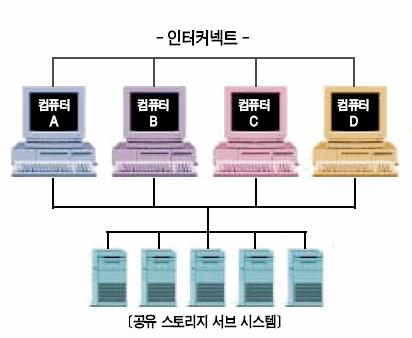
1 Oracle RAC9i(R2) for Sun Cluster Workshop RAC 개념 RAC 는하드웨어클러스터상에서운영된다. 클러스터는단일시스템으로서함께연동되는독립서버 ( 노드 ) 그룹이다. 주요클러스터컴포넌트는프로세서노드, 클러스터인터커넥트및공유스토리지서브시스템등이다. 노드는데이타를관리하는스토리지서브시스템과자원에대한액세스를공유하지만개별노드에서메인메모리를물리적으로공유하지는않는다. ORAC 은개별노드의메모리를결합해전체데이타베이스시스템에대한분산캐시메모리의단일뷰를제공한다. 노드는다중프로세서로구성될수있다. 대표적인노드유형은 SMP(Symmetric Multi-Processor) 노드이다. 각노드는자체전용시스템메모리뿐만아니라자체운영체계, 데이타베이스인스턴스및애플리케이션소프트웨어를보유하고있다. 클러스터의장점 단일대규모노드보다클러스터를이용함으로써실현되는이점은다음과같다. - 시스템이원하는용량으로확장할수있도록지원하는용량계획의유연성및비용효율성 - 특히노드장애발생시클러스터내부분적장애에대한폴트톨로런스 확장성 ORAC 은용량에대한요구가증가함에따라클러스터에노드를추가할수있는유연성을사용자에게제공함으로써시스템을단계적으로확장해자본투자비용을절감하고소규모단일노드시스템을대규모노드시스템으로교체해야하는필요성을없애도록했다. 대부분의경우 1-67

2 시스템을업그레이드하기위해완전히새로운대규모노드를이용하는대신유사하거나동일한구성을보유한하나이상의노드가클러스터에추가되기때문에이는보다쉽고신속하게용량업그레이드프로세스를실행할수있도록하게된다. ORAC 에구현된 Cache Fusion 기술은거의선형적으로용량을확장할수있도록지원한다. 고가용성클러스터아키텍처의또다른주요장점은다중노드에의해제공되는고유폴트톨로런스이다. 물리적인노드가독립적으로운영되기때문에하나이상의노드에장애가발생하더라도클러스터의여타노드에영향을미치지않는다. 극한상황의경우, 클러스터시스템은단하나의노드만이생존하더라도이용할수있기때문에클러스터를토대로하는시스템은고도의가용성을실현할수있게된다. 또한이아키텍처는유지보수를위해노드그룹이오프라인으로되어있는동안나머지클러스터가서비스를온라인으로제공할수있도록지원한다. 9i (RAC) New Feautes Cache Fusion - 모든 node 의 interconnected cache 를활용한다. - write/write 충돌시필요한 data block 을 remote node 의 cache 에서바로요청한 Instance 로고속 interconect 를통하여전송 - Update 작업의동기화를위한 Disk I/O 불필요하다. ( 이전버전에서는 Cache 상에변경되어있는 Block 을 Disk 에기록한후, 다른 Instance 는해당 Block 을 Disk 에서 Cache 로다시읽어변경작업을하는 Ping protocol 사용 ) Cache Fusion 기법의개념적구조 Node A Data Transfer Node B Reques t Databas e buffers Databas e buffers Databas e 2-67
3 Cache Fusion 을이용한경우의비교 100 msec Block Access Time(ms) Without Cache Fusion With Cache Fusion Time to write data block to disk 20 msec 1 msec 0.01 msec Block in Local Cache Block in Remote Cache Block on Disk Real Application Clusters Installation Overview Oracle Real Application Clusters Validation Matrix RAC 구축 1. Install the operating system-dependent (OSD) clusterware. The OSD clusterware installation process varies according to platform: 1.1 For UNIX, refer to your vendor documentation and to the documentation for the SunCluster UDLM patch. 2. If you are not using a cluster file system, then configure the shared disks 3. Run the OUI to install the Oracle9i Enterprise Edition and the Oracle9i Real Application Clusters software 4. Create and configure your database as described in either: 4.1 Create a RAC Database using the Oracle Database Configuration Assistant(DBCA), or: 4.2 Manually Creating Real Application Clusters Databases 5. Single Database 에서 RAC 구현하기 (node 추가하기 ) 6. Administering Real Application Clusters Instances ( 옵션 ) 3-67
4 7. Network 구성 & CTF (Connection Time Failover) vs TAF (Transparent Application Failover) Trouble Shooting 4-67
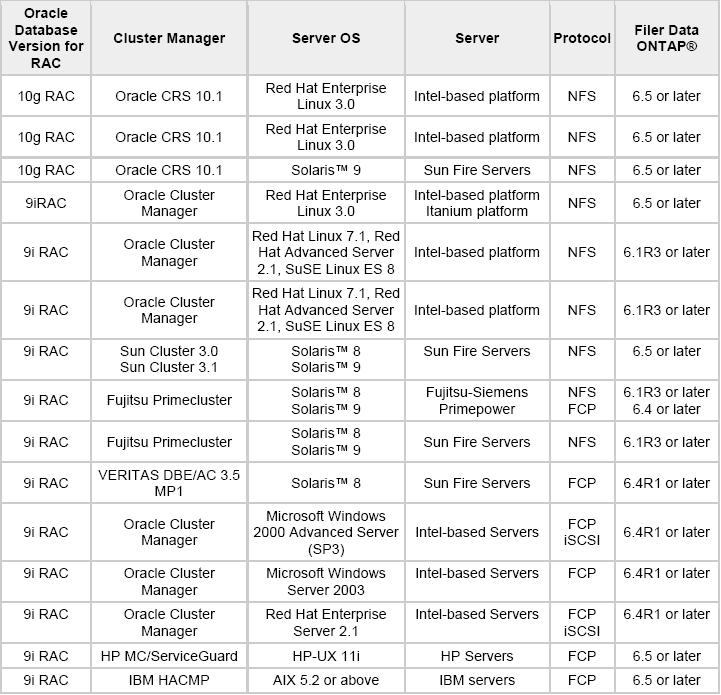
5 Oracle Real Application Clusters Validation Matrix Oracle Real Application Clusters is a proven way to scale applications both in terms of number of users and volume of transactions. Additionally, Oracle Real Application Clusters provides proven availability that is a must for any mission-critical application. In this environment, Network Appliance enables these mission-critical applications to scale storage rapidly on an as-needed basis without any unplanned downtime. With its software offerings like Snapshot, SnapMirror, and SnapRestore, Network Appliance provides a proven and compelling platform that makes the Oracle Real Application Clusters implementation even more unbreakable. Oracle has created an extensive test suite that validates compatibility of servers and storage with Oracle Real Application Clusters database. NetApp has received the validation for the following products from Oracle and Cluster Software vendors. Following is a matrix of Oracle Real Application Clusters Validation. 5-67
6 RAC Inatallation 1. Install the operating system-dependent (OSD) clusterware. The OSD clusterware installation process varies according to platform: 1.1 Sun Cluster Installation UDLM package The Sun Cluster install CD's contain the required SC udlm package:- Package SUNWudlm Sun Cluster Support for Oracle Parallel Server UDLM, (opt) on SunCluster v3 To install use the pkgadd command:- # pkgadd -d. SUNWudlm Once installed, Oracle's interface with this, the Oracle UDLM, can be installed VxVM 을사용할경우 To install Sun Cluster Support for RAC with VxVM, the following Sun Cluster 3 Agents data services packages need to be installed as superuser (see Sun's Sun Cluster 3 Data Services Installation and Configuration Guide):- # pkgadd -d. SUNWscucm SUNWudlmr SUNWcvmr SUNWcvm (SUNWudlm will also need to be included unless already installed from the step above) UDLM package check 및 UDLM patch Before rebooting the nodes, you must ensure that you have correctly installed and configured the Oracle UDLM software. The Oracle Unix Distributed Lock Manager (ORCLudlm also known as the Oracle Node Monitor) must be installed. This may be referred to in the Oracle documentation as the "Parallel Server Patch". To check version information on any previously installed dlm package: $ pkginfo -l ORCLudlm grep PSTAMP OR $ pkginfo -l ORCLudlm grep VERSION You must apply the following steps to all cluster nodes. The Oracle udlm can be found on Disk1 of the Oracle9i server installation CD-ROM, in the directory opspatch or racpatch in later versions. Oracle patchsets may also ship udlm installs which are again found in the Disk1 racpatch directory of the patchset. A version of the Oracle udlm may also be found on the Sun Cluster CD set but check the Oracle release for the latest applicable version. The informational files README.udlm & release_notes.334x are located in this directory with version and install 6-67
7 information. This is the Oracle udlm package for 7.X.X or later on Solaris Operating System (SPARC) and requires any previous versions to be removed prior to installation. Use the latest udlm pacakge as this supports previous versions of Oracle RAC and Parallel Server provided that the same bit-size (32-bit or 64-bit) for Oracle is used throughout. Shutdown all existing clients of Oracle Unix Distributed Lock Manager (including all Oracle Parallel Server/RAC instances). Become super user. Reboot the cluster node in non-cluster mode (replace <node name> with your cluster node name):- # scswitch -S -h <node name> # shutdown -g 0 -y... wait for the ok prompt ok boot -x Unpack the file ORCLudlm.tar.Z into a directory: cd <CD-ROM mount>/opspatch #(or racpatch in later versions) cp ORCLudlm.tar.Z /tmp cd /tmp uncompress ORCLudlm.tar.Z tar xvf ORCLudlm.tar Install the patch by adding the package as root: cd /tmp pkgadd -d. ORCLudlm The udlm configuration files in SC2.X and SC3.0 are the following: SC2.X: /etc/opt/sunwcluster/conf/<default_cluster_name>.ora_cdb SC3.0: /etc/opt/sunwcluster/conf/udlm.conf The udlm log files in SC2.X and SC3.0 are the following: SC2.X: /var/opt/sunwcluster/dlm_<node_name>/logs/dlm.log SC3.0: /var/cluster/ucmm/dlm_<node_name>/logs/dlm.log pkgadd will copy a template file, <configuration_file_name>.template, to /etc/opt/sunwcluster/conf. Now that udlm (also referred to as the "Cluster Membership Monitor") is installed, you can start it up by rebooting the cluster node in cluster mode:- # shutdown -g 0 -y -i
8 2. Configure the shared disks and UNIX preinstallation tasks. 2.1 Configure the shared disks(raw Device 생성 ) The Oracle instances in the RAC configuration write information to raw devices defined for: The control file The spfile.ora Each datafile Each ONLINE redo log file Server Manager (SRVM) configuration information : svrctl 기능을사용할경우필요 It is therefore necessary to define raw devices for each of these categories of file. The Oracle Database Configuration Assistant (DBCA) will create a seed database expecting the following configuration: Create a Raw Device for: File Size Sample name SYSTEM tablespace 400 MB db_name_raw_system_400 USERS tablespace 120 MB db_name_raw_user_120 TEMP tablespace 100 MB db_name_raw_temp_100 An undo tablespace per instance 500 MB db_name_raw_undo_500 OEMREPO 20 MB db_name_raw_oemrepo_20 INDX tablespace 70 MB db_name_raw_indx_70 TOOLS tablespace 12 MB db_name_raw_tools_12 DRYSYS tablespace 90 MB db_name_raw_dr_90 EXAMPLES tablespace 160 MB db_name_raw_examples_160 First control file 110 MB db_name_raw_control01_110 Second control file 110 MB db_name_raw_control02_110 Two redo log files per instance 120 MB per file db_name_thread_lognumb_120 Spfile.ora 5 MB db_name_raw_spfile_5 Srvmconfig 100 MB db_name_raw_srvmconf_100 Srvmconfig file 은 svrctl 기능을사용할경우필요하다 On the node from which you run the Oracle Universal Installer, create an ASCII file identifying the raw volume objects as shown above. The DBCA requires that these objects exist during installation and database creation. When creating the ASCII file content for the objects, name them using the format: database_object=raw_device_file_path When you create the ASCII file, separate the database objects from the paths with equals (=) signs as shown in the example below:- system=/dev/vx/rdsk/oracle_dg/clustdb_raw_system_400m spfile=/dev/vx/rdsk/oracle_dg/clustdb_raw_spfile_5m users=/dev/vx/rdsk/oracle_dg/clustdb_raw_users_120m temp=/dev/vx/rdsk/oracle_dg/clustdb_raw_temp_100m undotbs1=/dev/vx/rdsk/oracle_dg/clustdb_raw_undotbs1_290m 8-67
9 undotbs2=/dev/vx/rdsk/oracle_dg/clustdb_raw_undotbs2_290m example=/dev/vx/rdsk/oracle_dg/clustdb_raw_example_30m cwmlite=/dev/vx/rdsk/oracle_dg/clustdb_raw_cwmlite_100m indx=/dev/vx/rdsk/oracle_dg/clustdb_raw_indx_70m tools=/dev/vx/rdsk/oracle_dg/clustdb_raw_tools_12m drsys=/dev/vx/rdsk/oracle_dg/clustdb_raw_dr_90m control1=/dev/vx/rdsk/oracle_dg/clustdb_raw_controlfile1_110m control2=/dev/vx/rdsk/oracle_dg/clustdb_raw_controlfile2_110m redo1_1=/dev/vx/rdsk/oracle_dg/clustdb_raw_log11_120m redo1_2=/dev/vx/rdsk/oracle_dg/clustdb_raw_log12_120m redo2_1=/dev/vx/rdsk/oracle_dg/clustdb_raw_log21_120m redo2_2=/dev/vx/rdsk/oracle_dg/clustdb_raw_log22_120m You must specify that Oracle should use this file to determine the raw device volume names by setting the following environment variable where filename is the name of the ASCII file that contains the entries shown in the example above: setenv DBCA_RAW_CONFIG filename or export DBCA_RAW_CONFIG=filename $ vi /var/opt/oracle/srvconfig.loc srvconfig_loc=/dev/vx/rdsk/datadg/rac_srvconfig_10m 2.2 UNIX Preinstallation Steps Group(dba) 생성 ( 각 node 에서실행 ) # groupadd g 900 dba User(oracle) 생성 ( 각 node 에서실행 ) # useradd -g dba -u 900 -m -d /oracle -s /bin/ksh oracle # passwd oracle remote shell(rcp, rlogin, rsh) 구성 Select the node from which you will run the Oracle Universal Installer (OUI) and establish user equivalence by adding an entry for all nodes in the cluster, including the local node, to the.rhosts file of the oracle account, or to the /etc/host.equiv file Set up user equivalence for the oracle account, to enable rsh, rcp, rlogin commands. /etc/hosts (on all nodes) localhost sc1 loghost sc inter inter2 /etc/hosts.equiv file. Put the list of machines or nodes into hosts.equiv. /etc/hosts.equiv (on all nodes) +sc1 root 9-67
10 +sc2 root +sc1 oracle +sc2 oracle +inter1 root +inter2 root +inter1 oracle +inter2 oracle.rhosts file. In the root and oracle users home directory, put the list of machines into.rhosts. [sc1:oracle:/oracle]% cat /oracle/.rhosts + Note : It is possible, though not advised for security reasons, to put a + in the hosts.equiv and.rhosts files. Test if the user equivalence is correctly set up (node2 is the secondary cluster machine) : Logged on node1 as oracle (then, as root) : $ rlogin node2 (-> no pwd) $ rcp /tmp/toto node2:/tmp/toto $ rsh node2 pwd remote shell test [sc1:oracle:/oracle]% touch test [sc1:oracle:/oracle]% rcp test sc2:/oracle [sc2:oracle:/oracle]% rsh sc2 ls -l total 16 drwx root root 8192 Mar 5 05:04 lost+found -rw-r--r-- 1 oracle dba 0 Mar 5 11:15 test System Kernel Parameters( 각 node 에설정 ) Kernel Parameter Setting Purpose SHMMAX Maximum allowable size of one shared memory segment (4 Gb) SHMMIN 1 Minimum allowable size of a single shared memory segment. SHMMNI 100 Maximum number of shared memory segments in the entire system. SHMSEG 10 Maximum number of shared memory segments one process can attach. SEMMNI 1024 Maximum number of semaphore sets in the entire system. SEMMSL 100 Minimum recommended value. SEMMSL should be 10 plus the largest PROCESSES parameter of any Oracle database on the system. SEMMNS 1024 Maximum semaphores on the system. This setting is a minimum recommended value. SEMMNS should be set to the sum of the PROCESSES parameter for each Oracle database, add the largest one twice, plus add an additional 10 for each database. SEMOPM 100 Maximum number of operations per semop call. SEMVMX Maximum value of a semaphore. (swap space) 750 MB Two to four times your system's physical memory size. /etc/system (on all nodes) set shmsys:shminfo_shmmax= set shmsys:shminfo_shmmin=1 set shmsys:shminfo_shmmni=100 set shmsys:shminfo_shmseg=
11 set semsys:seminfo_semmap=100 set semsys:seminfo_semmni=1024 set semsys:seminfo_semmns=1024 set semsys:seminfo_semmnu=2500 set semsys:seminfo_semmsl=100 set semsys:seminfo_semopm=100 set semsys:seminfo_semume=2500 set semsys:seminfo_semvmx=32767 set msgsys:msginfo_msgmax=16384 set msgsys:msginfo_msgmnb=16384 set msgsys:msginfo_msgmni=2200 set msgsys:msginfo_msgtql=2500 forceload: sys/shmsys forceload: sys/semsys forceload: sys/msgsys Establish system environment variables Set a local bin directory in the user's PATH, such as /usr/local/bin, or /opt/bin. It is necessary to have execute permissions on this directory. Set the DISPLAY variable to point to the system's (from where you will run OUI) IP address, or name, X server, and screen. Set a temporary directory path for TMPDIR with at least 20 Mb of free space to which the OUI has write permission Establish Oracle environment variables: Set the following Oracle environment variables: Environment Variable ORACLE_BASE ORACLE_HOME ORACLE_TERM NLS_LANG ORA_NLS33 eg /u01/app/oracle eg /u01/app/oracle/product/9201 xterm Suggested value AMERICAN-AMERICA.UTF8 for example $ORACLE_HOME/ocommon/nls/admin/data PATH Should contain $ORACLE_HOME/bin CLASSPATH $ORACLE_HOME/JRE:$ORACLE_HOME/jlib \ $ORACLE_HOME/rdbms/jlib: \ $ORACLE_HOME/network/jlib Create the directory /var/opt/oracle and set ownership to the oracle user. Verify the existence of the file /opt/sunwcluster/bin/lkmgr. This is used by the OUI to indicate that the installation is being performed on a cluster. [sc1:oracle:/oracle]% cat /oracle/.profile (on all nodes) 11-67
12 umask 022 set filec set -o trackall set -o vi stty erase ^H stty -istrip cs8 erase ^H stty -istrip cs8 werase ^W stty -istrip cs8 intr ^C export PATH=/usr/local/bin/:$PATH export PATH=/bin:/usr/bin:/usr/sbin:/usr/ccs/bin:/usr/ucb:/usr/ucb/bin:/usr/local/bin:/etc:. export PATH=/usr/openwin/bin:/usr/j2se/jre/bin:/usr/j2se/jre/lib:/usr/j2se/bin:$PATH export EDITOR=vi export LANG=ko export ENV=./.kshrc export PS1=[`hostname`:`whoami`:'$PWD]% ' alias alias alias alias alias alias alias df='df -k' rm='rm -i' ll='ls -al' dead='/usr/ucb/ps -aux more' cls='clear' ls='ls -af' ptd='/usr/platform/sun4u/sbin/prtdiag -v' #export DISPLAY= :0.0 export ORACLE_BASE=/oracle/app/oracle export ORACLE_HOME=$ORACLE_BASE/product/920 export ORACLE_TERM=vt100 export ORACLE_SID=RAC1 # node2(sc2) 에서는 RAC2 로설정 export TNS_ADMIN=$ORACLE_HOME/network/admin export PATH=$PATH:$ORACLE_HOME/bin:$ORACLE_HOME/ctx/bin:/tmp/OPatch:$ORACLE_HOME/Apatch/perl/bin export NLS_LANG=American_America.KO16KSC5601 export ORA_NLS33=$ORACLE_HOME/ocommon/nls/admin/data export LD_LIBRARY_PATH=$ORACLE_HOME/lib32:$ORACLE_HOME/lib:/usr/lib:/usr/local/lib:$DAMO_INST_HOME export CLASSPATH=$ORACLE_HOME/jre/1.4.2/bin #export LD_LIBRARY_PATH=$ORACLE_HOME/lib:/usr/lib:/usr/local/lib export DATE=d`date`+%Y%m%d export LANG=ko export TMPDIR=/tmp alias oh='cd $ORACLE_HOME' alias ob='cd $ORACLE_BASE/admin/RAC/bdump' alias ss='sqlplus "/as sysdba"' 12-67
13 Verification Script (Note: ) Note: There is a verification script InstallPrep.sh available which may be downloaded and run prior to the installation of Oracle Real Application Clusters. This script verifies that the system is configured correctly according to the Installation Guide. The output of the script will report any further tasks that need to be performed before successfully installing Oracle 9.x DataServer (RDBMS). This script performs the following verifications:- ORACLE_HOME Directory Verification UNIX User/umask Verification UNIX Group Verification Memory/Swap Verification TMP Space Verification Real Application Cluster Option Verification Unix Kernel Verification Unix InstallPrep Script The Unix InstallPrep Script should be run prior to installing the Oracle to 9.2 DataServer. This script checks for all known items that will cause the install to fail. Follow these steps to download and run the script: 1. Change the name of the script to InstallPrep.sh 2. Ftp the InstallPrep.sh script (in ascii format) to the Unix system that you will be installing the Oracle DataServer on. 3. Change the permissions of the script to execute for the user running the script: chmod 777 InstallPrep.sh 4. Log in as the user that will be installing the Oracle software. 5. Copy the InstallPrep.sh script to the /tmp directory and run it from this location. 6. Note: on some Linux platforms you may get the error "bad interpreter", just run the command 'sh InstallPrep.sh' and the try running it. Otherwise, you can try "dos2unix InstallPrep.sh" and then retry it. 7. Answer the first few questions, the output from the script will be written to /tmp/installprep.out and the errors written to /tmp/installprep.err. 8. Resolve any problems found in /tmp/installprep.err and then install the Oracle DataServer software.../installprep.sh 13-67
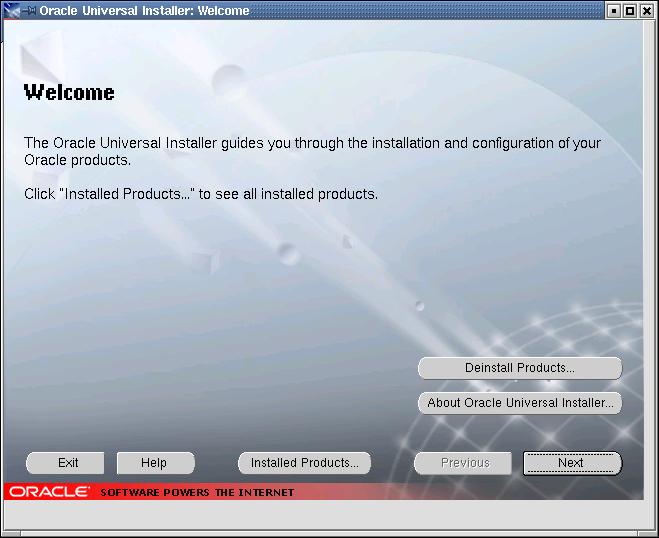
14 3 Using the Oracle Universal Installer for Real Application Clusters 3.1 install the Oracle Software Login as the oracle user # su oracle [sc1:oracle:/media/9i/disk1]% export LANG=C [sc1:oracle:/media/9i/disk1]%./runinstaller At the OUI Welcome screen, click Next
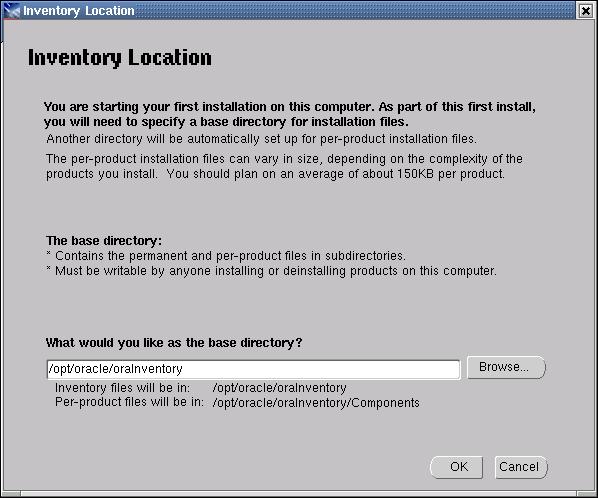
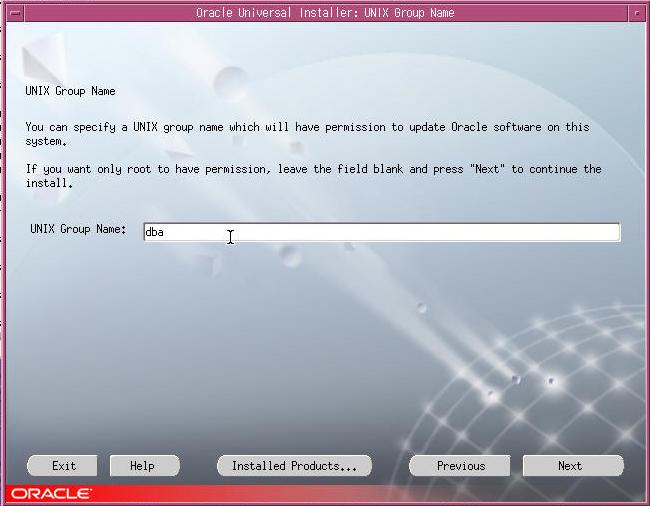
15 A prompt will appear for the Inventory Location (if this is the first time that OUI has been run on this system). This is the base directory into which OUI will install files. The Oracle Inventory definition can be found in the file /var/opt/oracle/orainst.loc. Click OK. Unix Group Name 15-67
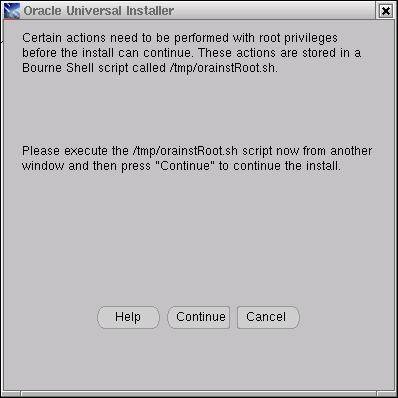
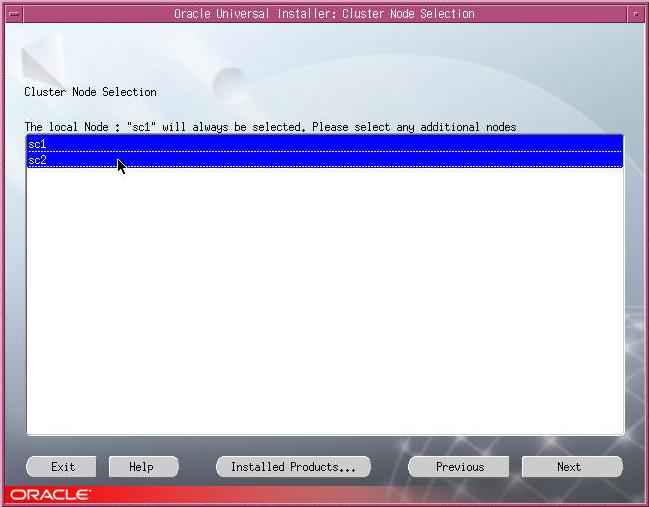
16 Verify the UNIX group name of the user who controls the installation of the Oracle9i software. If an instruction to run /tmp/orainstroot.sh appears, the pre-installation steps were not completed successfully. Typically, the /var/opt/oracle directory does not exist or is not writeable by oracle. Run /tmp/orainstroot.sh to correct this, forcing Oracle Inventory files, and others, to be written to the ORACLE_HOME directory. Once again this screen only appears the first time Oracle9i products are installed on the system. Click Next. Select the other nodes on to which the Oracle RDBMS software will be installed. It is not necessary to select the node on which the OUI is currently running. Click Next. Cluster Node Selection : <SHIFT> 키를누르면서 mouse 로화면에보이는모든 node 들을선택후에 Next 버튼을누른다. % 이부분을실행하면동시에각각의노드에 oracle 이설치된다
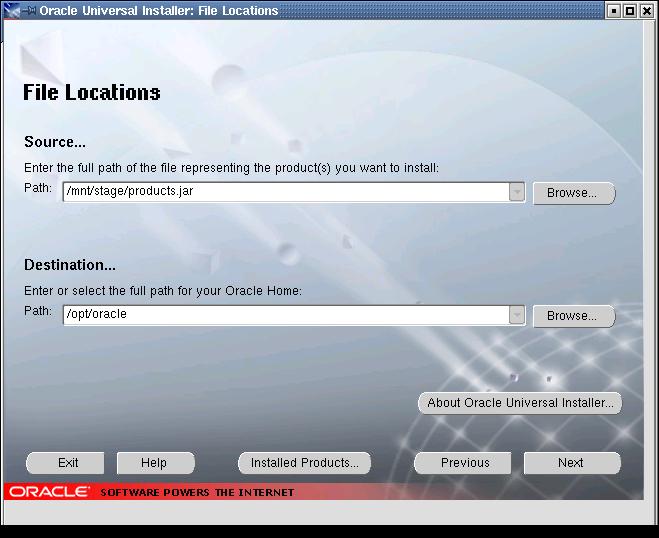
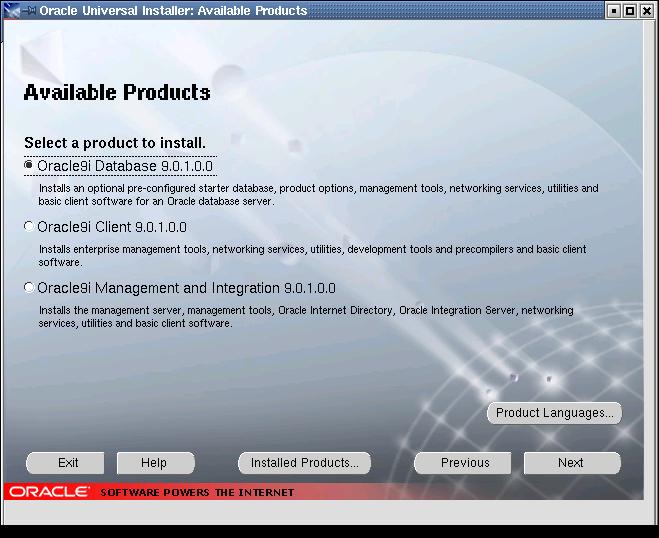
17 The File Location window will appear. Do NOT change the Source field. The Destination field defaults to the ORACLE_HOME environment variable. Click Next. Select the Products to install. In this example, select the Oracle9i Server then click Next
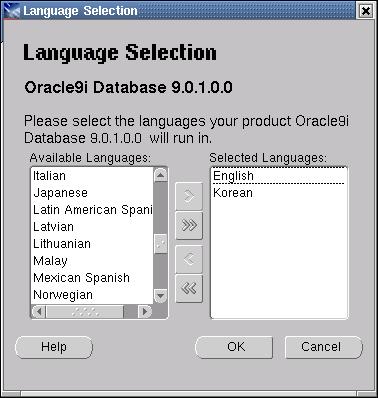
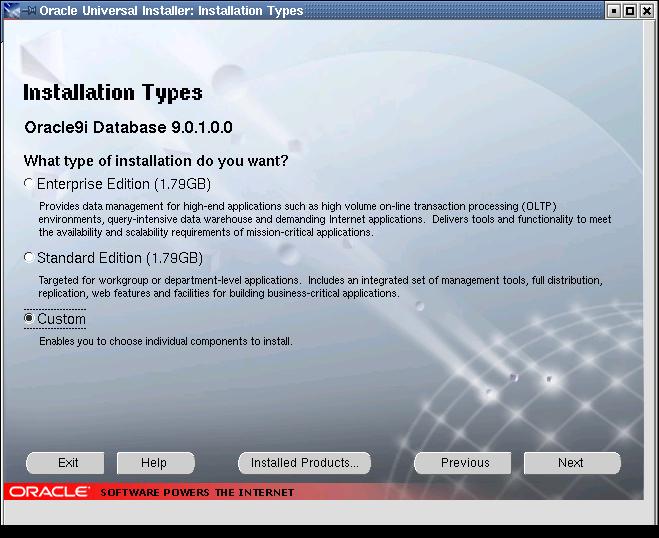
18 Product Language 를선택한다 Select the installation type. Choose the Custom option. Click Next
19 Oracle9i Real Application Cluster 를체크하고, 기타필요 / 불필요한 option 들을추가 / 제거한다. click Next. Identify the raw partition in to which the Oracle9i Real Application Clusters (RAC) configuration information will be written. It is recommended that this raw partition is a minimum of 100MB in size. Raw Device 생성시에생성한 Srvmconfig 파일명을입력한다
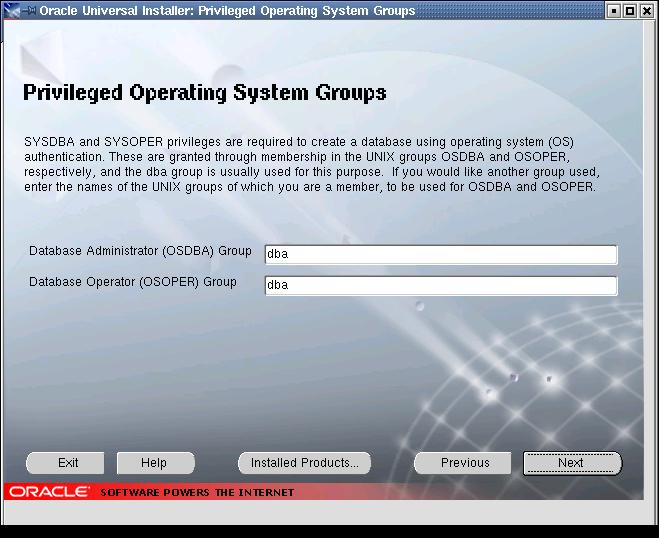
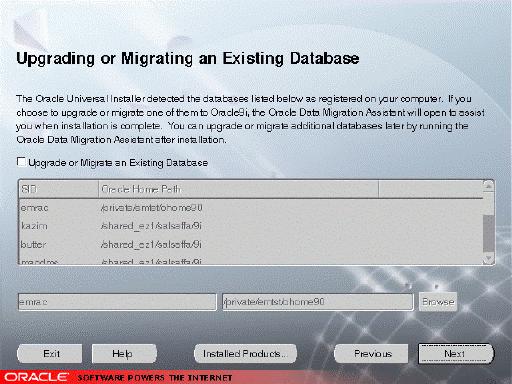
20 Privileged Operating System Groups dba 를입력한다. An option to Upgrade or Migrate an existing database is presented. Do NOT select the radio button. The Oracle Migration utility is not able to upgrade a RAC database, and will error if selected to do so
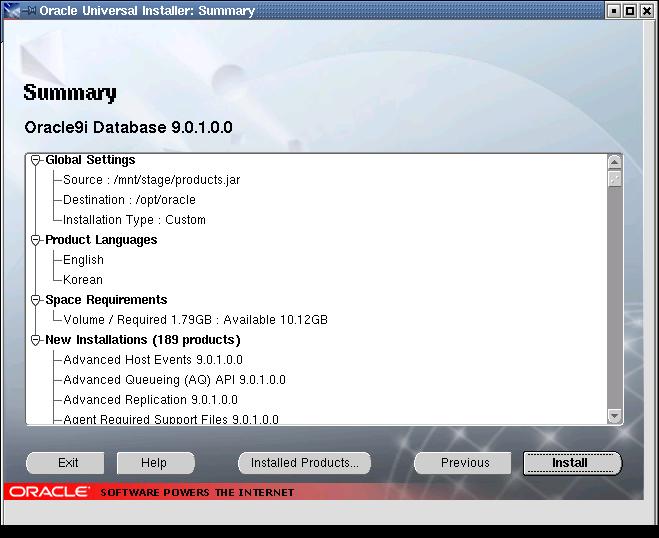
21 Create Database No 를선택하고, Next 를클릭한다. The Summary screen will be presented. Confirm that the RAC database software will be installed and then click Install. The OUI will install the Oracle9i software on to the local node, and then copy this information to the other nodes selected
22 Once Install is selected, the OUI will install the Oracle RAC software on to the local node, and then copy software to the other nodes selected earlier. This will take some time. During the installation process, the OUI does not display messages indicating that components are being installed on other nodes - I/O activity may be the only indication that the process is continuing. A screen indicating the OUI progress will be displayed 99% 에서 2 번 node 로 copy 한다.(cpio) ps 명령등으로확인할수있음
23 RAC option 제거하기 (manually) [oracle:/oracle/app/oracle/product/9.2.0/rdbms/lib] make -f ins_rdbms.mk rac_off rm -f /oracle/app/oracle/product/9.2.0/lib/libskgxp9.a cp /oracle/app/oracle/product/9.2.0/lib//libskgxpd.a /oracle/app/oracle/product/9.2.0/lib/libskgxp9.a rm -f /oracle/app/oracle/product/9.2.0/lib/libskgxn9.a cp /oracle/app/oracle/product/9.2.0/lib//libskgxns.a /oracle/app/oracle/product/9.2.0/lib/libskgxn9.a /bin/ar -X64 d /oracle/app/oracle/product/9.2.0/rdbms/lib/libknlopt.a kcsm.o /bin/ar -X64 cr /oracle/app/oracle/product/9.2.0/rdbms/lib/libknlopt.a /oracle/app/oracle/product/9.2.0/rdbms/lib/ksnkcs.o [oracle:/oracle/app/oracle/product/9.2.0/rdbms/lib] make -f ins_rdbms.mk ioracle - Linking Oracle rm -f /oracle/app/oracle/product/9.2.0/rdbms/lib/oracle ld -b64 -o /oracle/app/oracle/product/9.2.0/rdbms/lib/oracle -L/oracle/app/oracle/product/9.2.0/rdbms/lib/ - L/oracle/app/oracle/product/9.2.0/lib/ -bbigtoc -bnoipath -bi:/oracle/app/oracle/product/9.2.0/lib/ksms.imp /oracle/app/oracle/product/9.2.0/rdbms/lib/opimai.o /oracle/app/oracle/product/9.2.0/rdbms/lib/ssoraed.o /oracle/app/oracle/product/9.2.0/rdbms/lib/ttcsoi.o /oracle/app/oracle/product/9.2.0/lib/nautab.o /oracle/app/oracle/product/9.2.0/lib/naeet.o /oracle/app/oracle/product/9.2.0/lib/naect.o /oracle/app/oracle/product/9.2.0/lib/naedhs.o /oracle/app/oracle/product/9.2.0/rdbms/lib/config.o -lserver9 /oracle/app/oracle/product/9.2.0/lib/libodm9.so -lskgxp9 -lskgxn9 -lclient9 -lvsn9 -lwtcserver9 -lcommon9 -lgeneric9 /oracle/app/oracle/product/9.2.0/rdbms/lib/defopt.o -lknlopt `if /bin/ar -X64 tv /oracle/app/oracle/product/9.2.0/rdbms/lib/libknlopt.a grep xsyeolap.o > /dev/null 2>&1 ; then echo "-loraolap9 - be:/oracle/app/oracle/product/9.2.0/rdbms/lib/olap.exp -be:/oracle/app/oracle/product/9.2.0/rdbms/lib/libamd.exp" ; fi` - lslax9 -lpls9 -lplp9 -be:/oracle/app/oracle/product/9.2.0/rdbms/lib/plsqlncomp.exp -lserver9 -lclient9 -lvsn9 -lwtcserver9 -lcommon9 -lgeneric9 -lknlopt -lslax9 -lpls9 -lplp9 -ljox9 -be:/oracle/app/oracle/product/9.2.0/rdbms/lib//oracle.exp - lwwg9 `sed -e 's/-ljava//g' /oracle/app/oracle/product/9.2.0/lib/ldflags` -lncrypt9 -lnsgr9 -lnzjs9 -ln9 -lnl9 -lnzjs9 -lnro9 `sed -e 's/-ljava//g' /oracle/app/oracle/product/9.2.0/lib/ldflags` -lncrypt9 -lnsgr9 -lnzjs9 -ln9 -lnl9 -lnzjs9 -lclient9 - lvsn9 -lwtcserver9 -lcommon9 -lgeneric9 -lwtcserver9 -lmm -lnls9 -lcore9 -lnls9 -lcore9 -lnls9 -lxml9 -lcore9 -lunls9 - lnls9 `sed -e 's/-ljava//g' /oracle/app/oracle/product/9.2.0/lib/ldflags` -lncrypt9 -lnsgr9 -lnzjs9 -ln9 -lnl9 -lnzjs9 -lnro9 `sed -e 's/-ljava//g' /oracle/app/oracle/product/9.2.0/lib/ldflags` -lncrypt9 -lnsgr9 -lnzjs9 -ln9 -lnl9 -lnzjs9 -lclient9 - lvsn9 -lwtcserver9 -lcommon9 -lgeneric9 -lpls9 -ltrace9 -lnls9 -lcore9 -lnls9 -lcore9 -lnls9 -lxml9 -lcore9 -lunls9 -lnls9 - lclient9 -lvsn9 -lwtcserver9 -lcommon9 -lgeneric9 -lnls9 -lcore9 -lnls9 -lcore9 -lnls9 -lxml9 -lcore9 -lunls9 -lnls9 - lserver9 `if /bin/ar -X64 tv /oracle/app/oracle/product/9.2.0/rdbms/lib/libknlopt.a grep "kxmnsd.o" > /dev/null 2>&1 ; then echo " " ; else echo "-lordsdo9"; fi` -lctxc9 -lctx9 -lzx9 -lgx9 -lctx9 -lzx9 -lgx9 -lordimt9 -lnls9 -lcore9 -lnls9 -lcore9 -lnls9 - lxml9 -lcore9 -lunls9 -lnls9 -lsnls9 -lunls9 -be:/oracle/app/oracle/product/9.2.0/rdbms/lib//libcorejava.exp -lld -lm `cat /oracle/app/oracle/product/9.2.0/lib/sysliblist` -lm `if [ "\`/usr/bin/uname -v\`" = "4" ]; \ then echo "-bi:/oracle/app/oracle/product/9.2.0/lib/pw-syscall.exp"; fi;` `if /bin/ar -X64 t /oracle/app/oracle/product/9.2.0/rdbms/lib/libknlopt.a grep '^'kcsm.o > /dev/null 2>&1 ; then echo "-lha_gs64_r -lha_em_r"; fi` -locijdbcst9 -lxsd9 ld: WARNING: Symbol pevm_inmdh_indexed_adt is already exported. ld: WARNING: Symbol pevm_inmdh_indexed_char is already exported. ld: WARNING: Symbol pevm_inmdh_indexed_datetime is already exported. ld: WARNING: Symbol pevm_inmdh_indexed_indexed is already exported. ld: WARNING: Symbol pevm_inmdh_indexed_interval is already exported. ld: WARNING: Symbol pevm_inmdh_indexed_lob is already exported. ld: WARNING: Symbol pevm_inmdh_indexed_objref is already exported. ld: WARNING: Symbol pevm_inmdh_indexed_opq is already exported. ld: WARNING: Symbol pevm_inmdh_indexed_sscalar is already exported. ld: WARNING: Symbol pevm_inmdh_indexed_urowid is already exported. ld: WARNING: Symbol plzcls is already exported. ld: WARNING: Symbol plzexe is already exported. ld: WARNING: Symbol plzopn is already exported. ld: WARNING: Symbol plzosq is already exported. ld: WARNING: Symbol pevm_enter is already exported. ld: WARNING: Symbol pevm_movx is already exported
24 ld: WARNING: Symbol peslcl2 is already exported. ld: WARNING: Exported symbol not defined: pen_pipe ld: WARNING: Exported symbol not defined: pevm_movcadt ld: WARNING: Exported symbol not defined: pevm_movl ld: WARNING: Exported symbol not defined: pevm_movs ld: WARNING: Exported symbol not defined: pifi_i ld: WARNING: Object /oracle/app/oracle/product/9.2.0/lib//libordsdo9.a[mdrcr.o], imported symbol kcbstdbz_ Symbol was expected to be local. Extra instructions are being generated to reference the symbol. ld: WARNING: Object /oracle/app/oracle/product/9.2.0/lib//libordsdo9.a[mdrt.o], imported symbol kcbstdbz_ Symbol was expected to be local. Extra instructions are being generated to reference the symbol. ld: WARNING: TOC overflow. TOC size: Maximum size: Extra instructions are being generated for each reference to a TOC symbol if the symbol is in the TOC overflow area. mv -f /oracle/app/oracle/product/9.2.0/bin/oracle /oracle/app/oracle/product/9.2.0/bin/oracleo mv /oracle/app/oracle/product/9.2.0/rdbms/lib/oracle /oracle/app/oracle/product/9.2.0/bin/oracle chmod 6751 /oracle/app/oracle/product/9.2.0/bin/oracle RAC option 추가하기 (manually) [oracle:/oracle/app/oracle/product/9.2.0/rdbms/lib] make -f ins_rdbms.mk rac_on rm -f /oracle/app/oracle/product/9.2.0/lib/libskgxp9.a cp /oracle/app/oracle/product/9.2.0/lib//libskgxpu.a /oracle/app/oracle/product/9.2.0/lib/libskgxp9.a - Use reference SKGXN library rm -f /oracle/app/oracle/product/9.2.0/lib/libskgxn9.a cp /oracle/app/oracle/product/9.2.0/lib//libskgxnr.a /oracle/app/oracle/product/9.2.0/lib/libskgxn9.a /bin/ar -X64 d /oracle/app/oracle/product/9.2.0/rdbms/lib/libknlopt.a ksnkcs.o /bin/ar -X64 cr /oracle/app/oracle/product/9.2.0/rdbms/lib/libknlopt.a /oracle/app/oracle/product/9.2.0/rdbms/lib/kcsm.o [oracle:/oracle/app/oracle/product/9.2.0/rdbms/lib] make -f ins_rdbms.mk ioracle - Linking Oracle rm -f /oracle/app/oracle/product/9.2.0/rdbms/lib/oracle ld -b64 -o /oracle/app/oracle/product/9.2.0/rdbms/lib/oracle -L/oracle/app/oracle/product/9.2.0/rdbms/lib/ - L/oracle/app/oracle/product/9.2.0/lib/ -bbigtoc -bnoipath -bi:/oracle/app/oracle/product/9.2.0/lib/ksms.imp /oracle/app/oracle/product/9.2.0/rdbms/lib/opimai.o /oracle/app/oracle/product/9.2.0/rdbms/lib/ssoraed.o /oracle/app/oracle/product/9.2.0/rdbms/lib/ttcsoi.o /oracle/app/oracle/product/9.2.0/lib/nautab.o /oracle/app/oracle/product/9.2.0/lib/naeet.o /oracle/app/oracle/product/9.2.0/lib/naect.o /oracle/app/oracle/product/9.2.0/lib/naedhs.o /oracle/app/oracle/product/9.2.0/rdbms/lib/config.o -lserver9 /oracle/app/oracle/product/9.2.0/lib/libodm9.so -lskgxp9 -lskgxn9 -lclient9 -lvsn9 -lwtcserver9 -lcommon9 -lgeneric9 /oracle/app/oracle/product/9.2.0/rdbms/lib/defopt.o -lknlopt `if /bin/ar -X64 tv /oracle/app/oracle/product/9.2.0/rdbms/lib/libknlopt.a grep xsyeolap.o > /dev/null 2>&1 ; then echo "-loraolap9 - be:/oracle/app/oracle/product/9.2.0/rdbms/lib/olap.exp -be:/oracle/app/oracle/product/9.2.0/rdbms/lib/libamd.exp" ; fi` - lslax9 -lpls9 -lplp9 -be:/oracle/app/oracle/product/9.2.0/rdbms/lib/plsqlncomp.exp -lserver9 -lclient9 -lvsn9 -lwtcserver9 -lcommon9 -lgeneric9 -lknlopt -lslax9 -lpls9 -lplp9 -ljox9 -be:/oracle/app/oracle/product/9.2.0/rdbms/lib//oracle.exp - lwwg9 `sed -e 's/-ljava//g' /oracle/app/oracle/product/9.2.0/lib/ldflags` -lncrypt9 -lnsgr9 -lnzjs9 -ln9 -lnl9 -lnzjs9 -lnro9 `sed -e 's/-ljava//g' /oracle/app/oracle/product/9.2.0/lib/ldflags` -lncrypt9 -lnsgr9 -lnzjs9 -ln9 -lnl9 -lnzjs9 -lclient9 - lvsn9 -lwtcserver9 -lcommon9 -lgeneric9 -lwtcserver9 -lmm -lnls9 -lcore9 -lnls9 -lcore9 -lnls9 -lxml9 -lcore9 -lunls9 - lnls9 `sed -e 's/-ljava//g' /oracle/app/oracle/product/9.2.0/lib/ldflags` -lncrypt9 -lnsgr9 -lnzjs9 -ln9 -lnl9 -lnzjs9 -lnro9 `sed -e 's/-ljava//g' /oracle/app/oracle/product/9.2.0/lib/ldflags` -lncrypt9 -lnsgr9 -lnzjs9 -ln9 -lnl9 -lnzjs9 -lclient9 - lvsn9 -lwtcserver9 -lcommon9 -lgeneric9 -lpls9 -ltrace9 -lnls9 -lcore9 -lnls9 -lcore9 -lnls9 -lxml9 -lcore9 -lunls9 -lnls9 - lclient9 -lvsn9 -lwtcserver9 -lcommon9 -lgeneric9 -lnls9 -lcore9 -lnls9 -lcore9 -lnls9 -lxml9 -lcore9 -lunls9 -lnls
25 lserver9 `if /bin/ar -X64 tv /oracle/app/oracle/product/9.2.0/rdbms/lib/libknlopt.a grep "kxmnsd.o" > /dev/null 2>&1 ; then echo " " ; else echo "-lordsdo9"; fi` -lctxc9 -lctx9 -lzx9 -lgx9 -lctx9 -lzx9 -lgx9 -lordimt9 -lnls9 -lcore9 -lnls9 -lcore9 -lnls9 - lxml9 -lcore9 -lunls9 -lnls9 -lsnls9 -lunls9 -be:/oracle/app/oracle/product/9.2.0/rdbms/lib//libcorejava.exp -lld -lm `cat /oracle/app/oracle/product/9.2.0/lib/sysliblist` -lm `if [ "\`/usr/bin/uname -v\`" = "4" ]; \ then echo "-bi:/oracle/app/oracle/product/9.2.0/lib/pw-syscall.exp"; fi;` `if /bin/ar -X64 t /oracle/app/oracle/product/9.2.0/rdbms/lib/libknlopt.a grep '^'kcsm.o > /dev/null 2>&1 ; then echo "-lha_gs64_r -lha_em_r"; fi` -locijdbcst9 -lxsd9 ld: WARNING: Symbol pevm_inmdh_indexed_adt is already exported. ld: WARNING: Symbol pevm_inmdh_indexed_char is already exported. ld: WARNING: Symbol pevm_inmdh_indexed_datetime is already exported. ld: WARNING: Symbol pevm_inmdh_indexed_indexed is already exported. ld: WARNING: Symbol pevm_inmdh_indexed_interval is already exported. ld: WARNING: Symbol pevm_inmdh_indexed_lob is already exported. ld: WARNING: Symbol pevm_inmdh_indexed_objref is already exported. ld: WARNING: Symbol pevm_inmdh_indexed_opq is already exported. ld: WARNING: Symbol pevm_inmdh_indexed_sscalar is already exported. ld: WARNING: Symbol pevm_inmdh_indexed_urowid is already exported. ld: WARNING: Symbol plzcls is already exported. ld: WARNING: Symbol plzexe is already exported. ld: WARNING: Symbol plzopn is already exported. ld: WARNING: Symbol plzosq is already exported. ld: WARNING: Symbol pevm_enter is already exported. ld: WARNING: Symbol pevm_movx is already exported. ld: WARNING: Symbol peslcl2 is already exported. ld: WARNING: Exported symbol not defined: pen_pipe ld: WARNING: Exported symbol not defined: pevm_movcadt ld: WARNING: Exported symbol not defined: pevm_movl ld: WARNING: Exported symbol not defined: pevm_movs ld: WARNING: Exported symbol not defined: pifi_i ld: WARNING: Object /oracle/app/oracle/product/9.2.0/lib//libordsdo9.a[mdrcr.o], imported symbol kcbstdbz_ Symbol was expected to be local. Extra instructions are being generated to reference the symbol. ld: WARNING: Object /oracle/app/oracle/product/9.2.0/lib//libordsdo9.a[mdrt.o], imported symbol kcbstdbz_ Symbol was expected to be local. Extra instructions are being generated to reference the symbol. ld: WARNING: TOC overflow. TOC size: Maximum size: Extra instructions are being generated for each reference to a TOC symbol if the symbol is in the TOC overflow area. mv -f /oracle/app/oracle/product/9.2.0/bin/oracle /oracle/app/oracle/product/9.2.0/bin/oracleo mv /oracle/app/oracle/product/9.2.0/rdbms/lib/oracle /oracle/app/oracle/product/9.2.0/bin/oracle chmod 6751 /oracle/app/oracle/product/9.2.0/bin/oracle 25-67
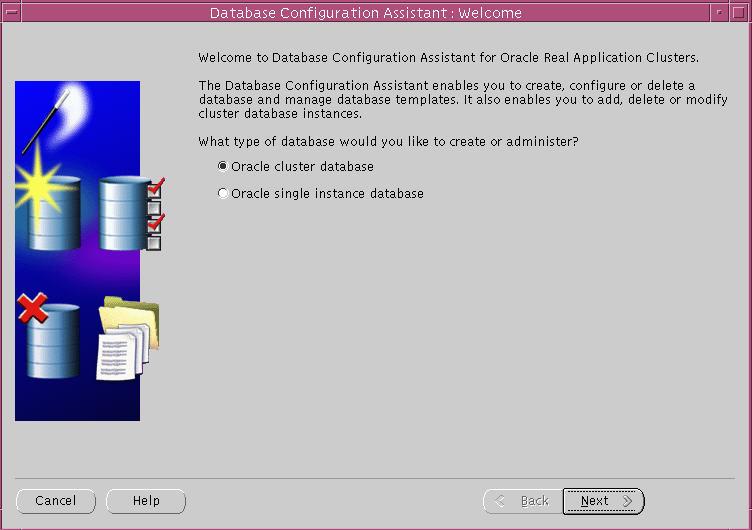
26 4. Create and configure your database 4.1 Create a RAC Database using the Oracle Database Configuration Assistant(DBCA) Verify that you correctly configured the shared disks for each tablespace (for non-cluster file system platforms) Create the database Configure the Oracle network services Start the database instances and listeners Oracle Corporation recommends that you use the DBCA to create your database. This is because the DBCA preconfigured databases optimize your environment to take advantage of Oracle9i features such as the server parameter file and automatic undo management. The DBCA also enables you to define arbitrary tablespaces as part of the database creation process. So even if you have datafile requirements that differ from those offered in one of the DBCA templates, use the DBCA. You can also execute user-specified scripts as part of the database creation process. The DBCA and the Oracle Net Configuration Assistant (NETCA) also accurately configure your Real Application Clusters environment for various Oracle high availability features and cluster administration tools. Note: Prior to running the DBCA it may be necessary to run the NETCA tool or to manually set up your network files. To run the NETCA tool execute the command netca from the $ORACLE_HOME/bin directory. This will configure the necessary listener names and protocol addresses, client naming methods, Net service names and Directory server usage. Also, it is recommended that the Global Services Daemon (GSD) is started on all nodes prior to running DBCA. To run the GSD execute the command gsd from the $ORACLE_HOME/bin directory. DBCA will launch as part of the installation process, but can be run manually by executing the command dbca from the $ORACLE_HOME/bin directory on UNIX platforms. The RAC Welcome Page displays. Choose Oracle Cluster Database option and select Next
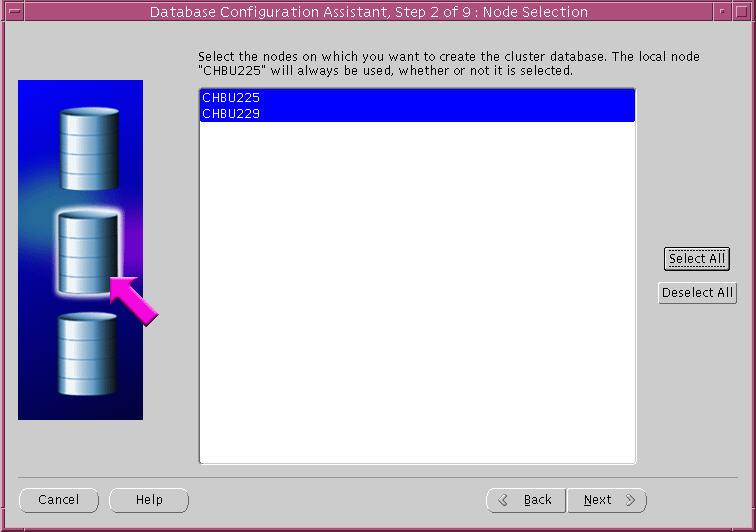
27 The Operations page is displayed. Choose the option Create a Database and click Next. The Node Selection page appears. Select the nodes that you want to configure as part of the RAC database and click Next. If nodes are missing from the Node Selection then perform clusterware diagnostics by executing the $ORACLE_HOME/bin/lsnodes -v command and analyzing its output. Refer to your vendor's clusterware documentation if the output indicates that your clusterware is not properly installed. Resolve the problem and then restart the DBCA
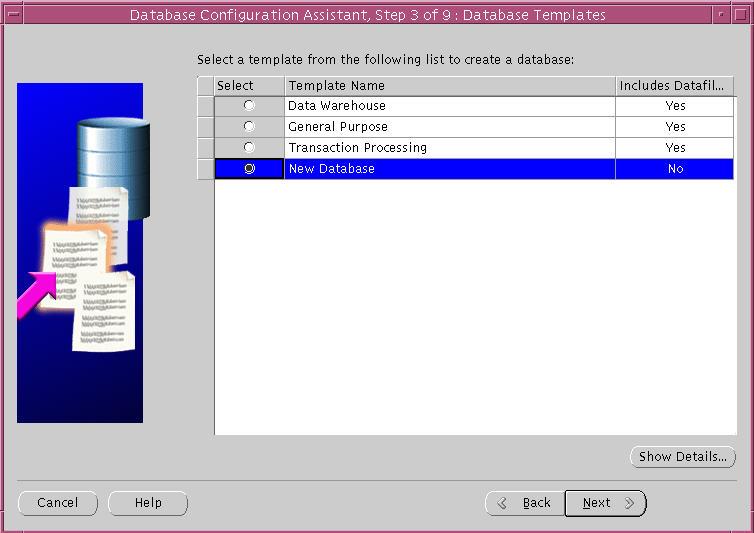
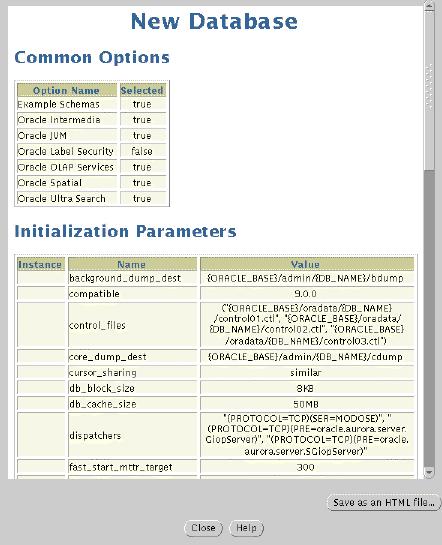
28 The Database Templates page is displayed. The templates other than New Database include datafiles. Choose New Database and then click Next. The Show Details button provides information on the database template selected
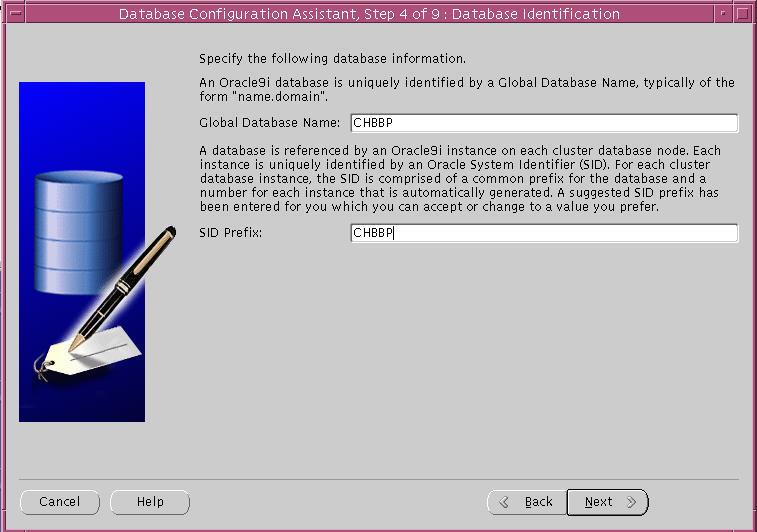
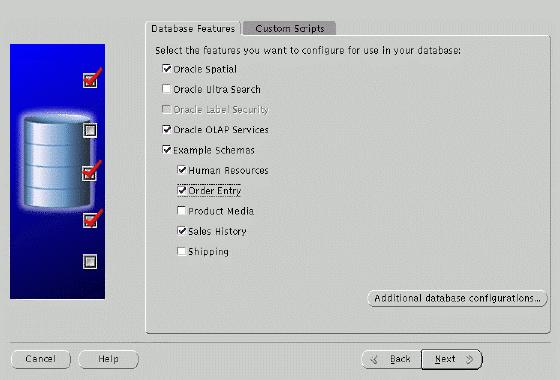
29 DBCA now displays the Database Identification page. Enter the Global Database Name and Oracle System Identifier (SID). The Global Database Name is typically of the form name.domain, for example mydb.us.oracle.com while the SID is used to uniquely identify an instance (DBCA should insert a suggested SID, equivalent to name1 where name was entered in the Database Name field). In the RAC case the SID specified will be used as a prefix for the instance number. For example, MYDB, would become MYDB1, MYDB2 for instance 1 and 2 respectively. The Database Options page is displayed. Select the options you wish to configure and then choose Next. Note: If you did not choose New Database from the Database Template page, you will not see this screen
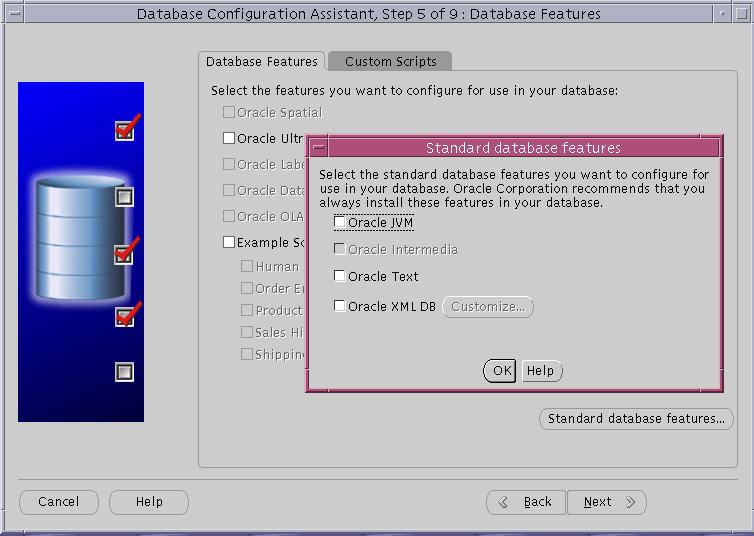
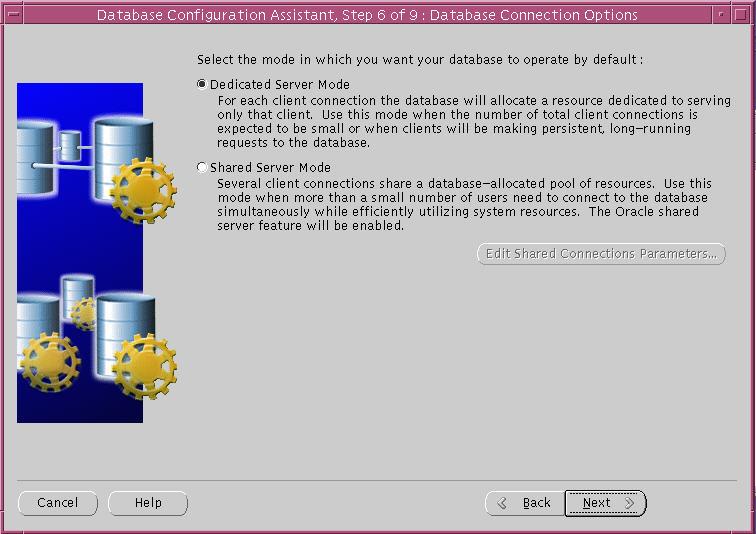
30 The Additional database Configurations button displays additional database features. Make sure both are checked and click OK. Select the connection options desired from the Database Connection Options page. Note: If you did not choose New Database from the Database Template page, you will not see this screen. Click Next
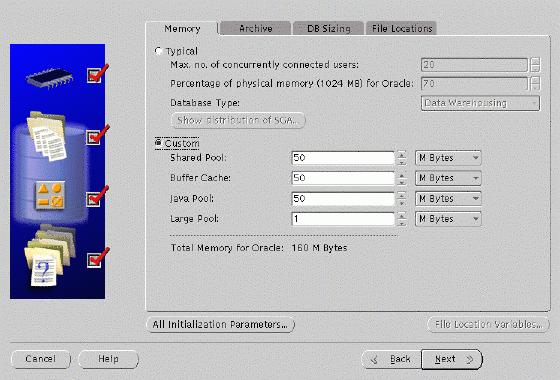
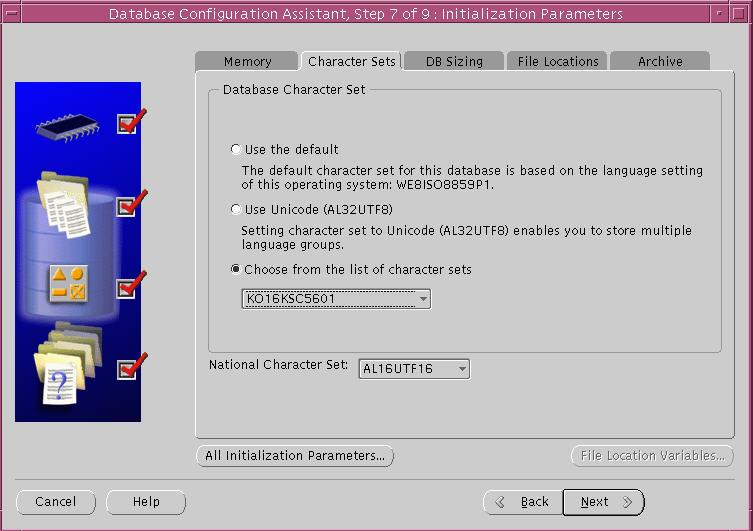
31 DBCA now displays the Initialization Parameters page. This page comprises a number of Tab fields. Modify the Memory settings if desired and then select the File Locations tab to update information on the Initialization Parameters filename and location. Then click Next
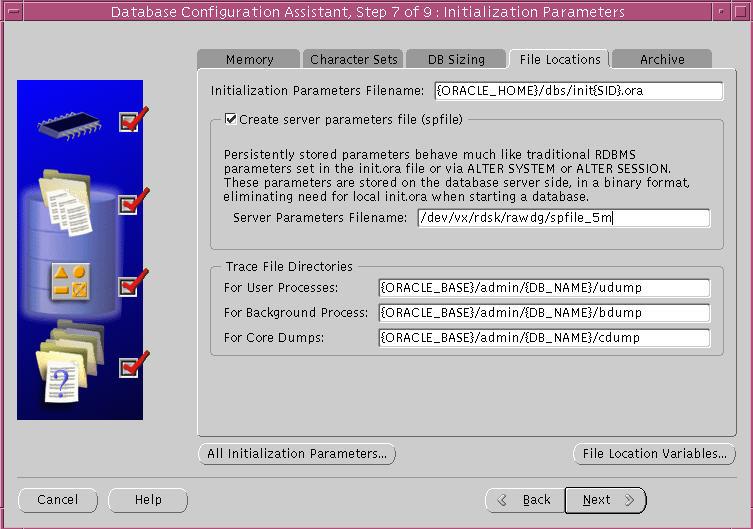
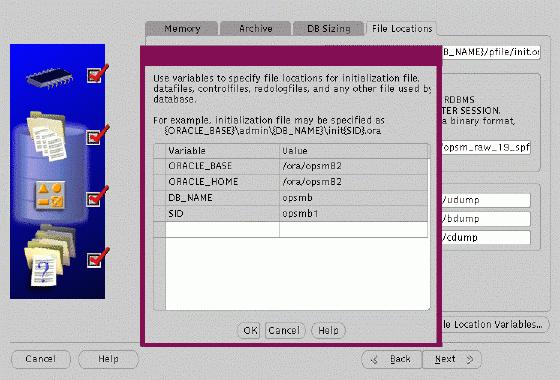
32 The option Create persistent initialization parameter file is selected by default. If you have a cluster file system, then enter a file system name, otherwise a raw device name for the location of the server parameter file (spfile) must be entered. Then click Next. The button File Location Variables displays variable information. Click OK
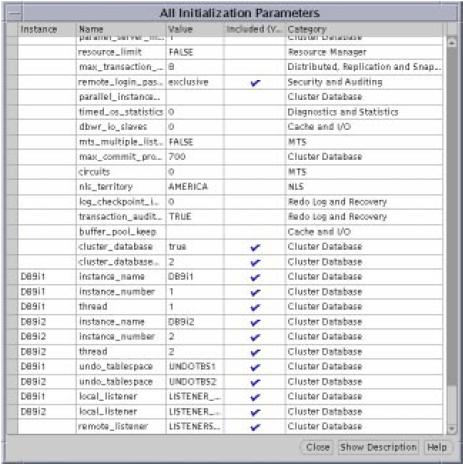
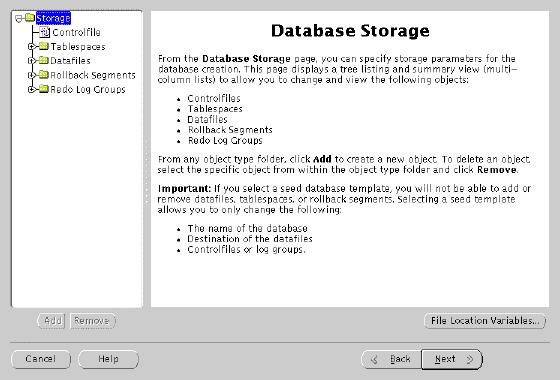
33 The button All Initialization Parameters displays the Initialization Parameters dialog box. This box presents values for all initialization parameters and indicates whether they are to be included in the spfile to be created through the check box, included (Y/N). Instance specific parameters have an instance value in the instance column. Complete entries in the All Initialization Parameters page and select Close. Note: There are a few exceptions to what can be altered via this screen. Ensure all entries in the Initialization Parameters page are complete and select Next. DBCA now displays the Database Storage Window. This page allows you to enter file names for each tablespace in your database
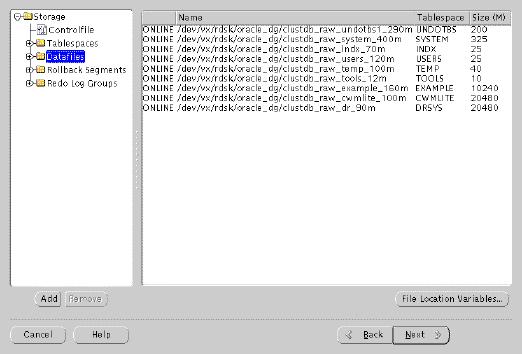
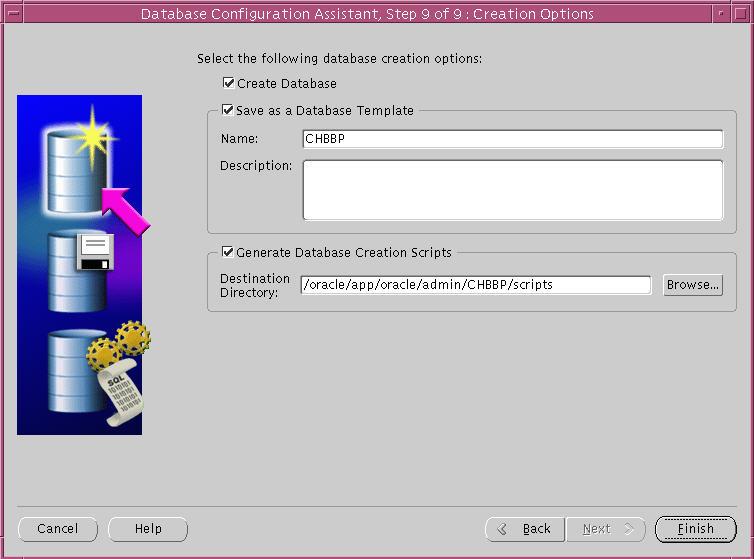
34 The file names are displayed in the Datafiles folder, but are entered by selecting the Tablespaces icon, and then selecting the tablespace object from the expanded tree. Any names displayed here can be changed. A configuration file can be used, see section 3.2.1, (pointed to by the environment variable DBCA_RAW_CONFIG). Complete the database storage information and click Next. The Database Creation Options page is displayed. Ensure that the option Create Database is checked and click Finish
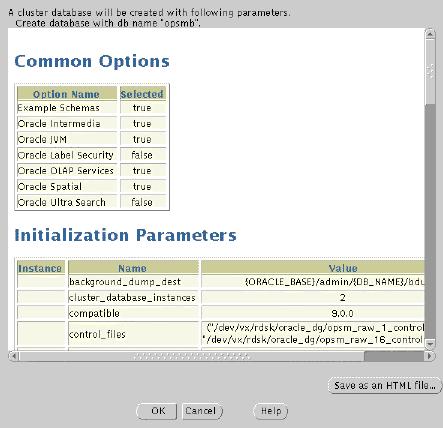
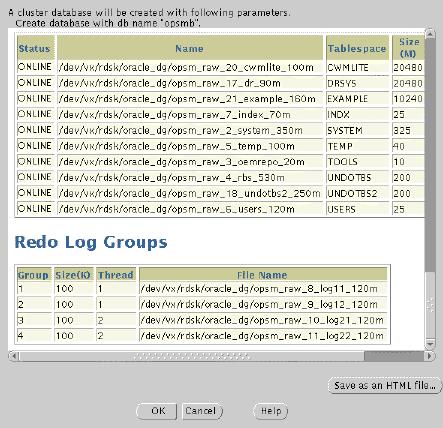
35 The DBCA Summary window is displayed. Review this information and then click OK
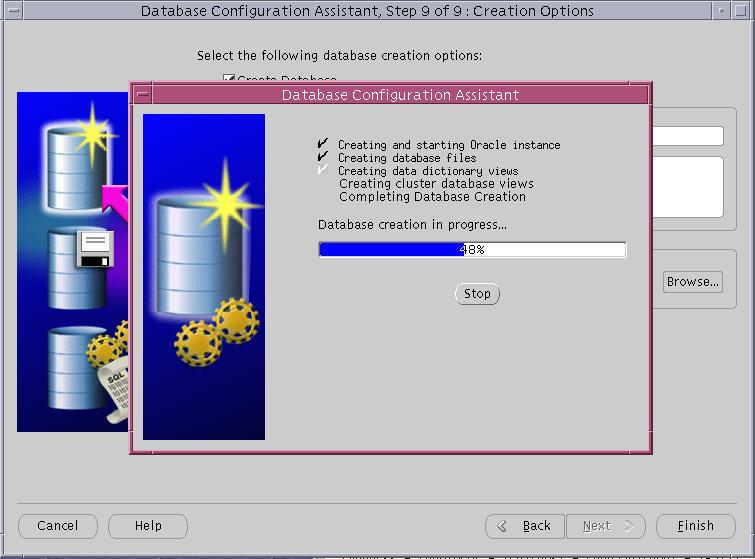
36 Once the Summary screen is closed using the OK option, DBCA begins to create the database according to the values specified
37 4.2 Manually Creating Real Application Clusters Databases ============================================================== Manual Database Creation steps for Real Application Clusters ( ) ============================================================== Here are the steps to be followed to create a Real Application Clusters database: 1. Make a init<sid>.ora in your $ORACLE_HOME/dbs directory. To simplify, you can copy init.ora to init<sid>.ora and modify the file. Remember that your control file must be pointing to a pre-existing raw device or cluster file system location. *** Path names, file names, and sizes will need to be modified Example parameter settings for the first instance: Cluster-Wide Parameters for Database "RAC": db_block_size=8192 db_cache_size= background_dump_dest=/oracle/app/oracle/product/9.0.1/rdbms/log core_dump_dest=/oracle/oracle/product/9.0.1/rdbms/log user_dump_dest=/oracle/oracle/product/9.0.1/rdbms/log timed_statistics=true control_files=("/dev/rac/control_01.ctl", "/dev/rac/control_02.ctl") db_name=rac shared_pool_size= sort_area_size= undo_management=auto cluster_database=true cluster_database_instances=2 remote_listener=listeners_rac Instance Specific Parameters for Instance "RAC1": instance_name=rac1 instance_number=1 local_listener=listener_rac1 thread=1 undo_tablespace=undotbs * The local_listener parameter requires that you first add the listener address to the TNSNAMES.ORA - remember to do so on both Node 1 and Node 2. ** You can also use an spfile as described in Note Run the following sqlplus command to connect to the database: sqlplus '/ as sysdba' 3. Startup up the database in NOMOUNT mode: SQL> startup nomount 37-67
38 4. Create the Database (All raw devices must be pre-created) : *** Path names, file names, and sizes will need to be modified CREATE DATABASE <db_name> CONTROLFILE REUSE MAXDATAFILES 254 MAXINSTANCES 32 MAXLOGHISTORY 100 MAXLOGMEMBERS 5 MAXLOGFILES 64 DATAFILE '/dev/rac/system_01_400.dbf' SIZE 400M REUSE AUTOEXTEND ON NEXT 10240K MAXSIZE UNLIMITED UNDO TABLESPACE "UNDOTBS" DATAFILE '/dev/rac/undotbs_01_210.dbf' SIZE 200M REUSE NEXT 5120K MAXSIZE UNLIMITED CHARACTER SET US7ASCII LOGFILE GROUP 1 ('/dev/rac/redo1_01_100.dbf') SIZE 100M REUSE, GROUP 2 ('/dev/rac/redo1_02_100.dbf') SIZE 100M REUSE; 5. Create a Users Tablespace: *** Path names, file names, and sizes will need to be modified CREATE TABLESPACE "USERS" LOGGING DATAFILE '/dev/rac/users_01_125.dbf' SIZE 120M REUSE NEXT 1280K MAXSIZE UNLIMITED EXTENT MANAGEMENT LOCAL; 6. Create a Temporary Tablespace: *** Path names, file names, and sizes will need to be modified CREATE TEMPORARY TABLESPACE "TEMP" TEMPFILE '/dev/rac/temp_01_50.dbf' SIZE 40M REUSE 7. Create a 2nd Undo Tablespace: *** Path names, file names, and sizes will need to be modified CREATE UNDO TABLESPACE "UNDOTBS2" DATAFILE '/dev/rac/undotbs_02_210.dbf' SIZE 200M REUSE NEXT 5120K MAXSIZE UNLIMITED; 8. Run the necessary scripts to build views, synonyms, etc.: The primary scripts that you must run are: i> CATALOG.SQL--creates the views of data dictionary tables and the dynamic performance views ii> CATPROC.SQL--establishes the usage of PL/SQL functionality and creates many of the PL/SQL Oracle supplied packages iii> CATCLUST.SQL--creates RAC specific views 38-67
39 9. Edit init<sid>.ora and set appropriate values for the 2nd instance on the 2nd Node: *** Names may need to be modified instance_name=rac2 instance_number=2 local_listener=listener_rac2 thread=2 undo_tablespace=undotbs2 10. From the first instance, run the following command: *** Path names, file names, and sizes will need to be modified RAC1-SQL> alter database add logfile thread 2 group 3 ('/dev/rac/redo2_01_100.dbf') size 100M, group 4 ('/dev/rac/redo2_02_100.dbf') size 100M; RAC1-SQL> alter database enable public thread 2; 11. Start the second Instance. (Assuming that your cluster configuration is up and running). RAC2-SQL> startup 39-67
40 5. Single Database 에서 RAC 구현하기 (Node 추가하기 ) 5.1 shutdown database / stop listener 5.2 network (rsh, rcp, rlogin) 구성 /etc/hosts.equive + + ~$HOME/.rhosts (all node) rcp test [RAC1:/oracle] $ rcp test node2:/oracle [RAC1:/oracle] $ rlogin node2 5.3 rac option 추가 (using OUI) 및 node2 로 rcp node1 에서 OUI 실행후, Available Product Components 에서 RAC 만추가설치 rcp 를이용해서 node1 의 product 를 node2 로 copy 한다. [RAC1:/oracle] $ rcp r /oracle/* node2:/oracle 5.4 node1 init<sid>.ora 수정및 clustered database startup maxinstance 수를체크하여 1 로되어있으면, 필요한 node 수이상으로 controlfile 을재생성한다 init<sid>.ora 수정 $ORACLE_HOME/initRAC1.ora ################################################################ 40-67
41 # Cluster Database ################################################################ cluster_database_instances=1 #cluster_database_instances=2 cluster_database=true #cluster_database=true instance_name=rac1 #instance_name=rac2 instance_number=1 #instance_number=2 #local_listener=listener_rac1 ##local_listener=listener_rac2 thread=1 #thread=2 undo_tablespace=undotbs1 #undo_tablespace=undotbs2 cluster_interconnects = #cluster_interconnects = log_archive_dest=/arch/rac1 #log_archive_dest=/arch/rac2 5.5 node2 (thread 2) 추가 (undo tablespace, Online redologfile 생성, archive dest 지정 (file system)) Thread 2 용 redolog 생성 RAC1-SQL> alter database add logfile thread 2 group 4 '/dev/rrac_redo2_01' size 100m; RAC1-SQL> alter database add logfile thread 2 group 5 '/dev/rrac_redo2_02' size 100m; RAC1-SQL> alter database add logfile thread 2 group 6 '/dev/rrac_redo2_03' size 100m; undotbs02 용 Undo tablespace 생성 RAC1-SQL> create undo tablespace undotbs2 datafile '/dev/rrac_undotbs02' size 500M reuse AUTOEXTEND ON NEXT 5120K MAXSIZE UNLIMITED; Thread 2 enable RAC1-SQL> alter database enable thread 2; 5.6 RAC 용 Data Dictionary 생성 5.7 node2 Database startup init<sid>.ora 수정 $ORACLE_HOME/initRAC1.ora ################################################################ # Cluster Database ################################################################ cluster_database_instances=2 #cluster_database_instances=1 cluster_database=true #cluster_database=true instance_name=rac2 #instance_name=rac1 instance_number=2 #instance_number=1 #local_listener=listener_rac2 ##local_listener=listener_rac1 thread=2 #thread=1 undo_tablespace=undotbs2 #undo_tablespace=undotbs1 cluster_interconnects = #cluster_interconnects = log_archive_dest=/arch/rac2 #log_archive_dest=/arch/rac1 RAC2-SQL> startup 41-67
42 6. Administering Real Application Clusters Instances Oracle Corporation recommends that you use SRVCTL to administer your Real Application Clusters database environment. SRVCTL manages configuration information that is used by several Oracle tools. For example, Oracle Enterprise Manager and the Intelligent Agent use the configuration information that SRVCTL generates to discover and monitor nodes in your cluster. Before using SRVCTL, ensure that your Global Services Daemon (GSD) is running after you configure your database. To use SRVCTL, you must have already created the configuration information for the database that you want to administer. You must have done this either by using the Oracle Database Configuration Assistant (DBCA), or by using the srvctl add command as described below. If this is the first Oracle9i database created on this cluster, then you must initialize the clusterwide SRVM configuration. Firstly, create or edit the file /var/opt/oracle/srvconfig.loc file and add the entry srvconfig_loc=path_name.where the path name is a small cluster-shared raw volume eg $ vi /var/opt/oracle/srvconfig.loc srvconfig_loc=/dev/vx/rdsk/datadg/rac_srvconfig_10m Then execute the following command to initialize this raw volume (Note: This cannot be run while the gsd is running. Prior to 9i Release 2 you will need to kill the.../jre/1.1.8/bin/... process to stop the gsd from running. From 9i Release 2 use the gsdctl stop command):- $ srvconfig -init The first time you use the SRVCTL Utility to create the configuration, start the Global Services Daemon (GSD) on all nodes so that SRVCTL can access your cluster's configuration information. Then execute the srvctl add command so that Real Application Clusters knows what instances belong to your cluster using the following syntax:- For Oracle RAC v9.0.1:- $ gsd Successfully started the daemon on the local node. $ srvctl add db -p db_name -o oracle_home Then for each instance enter the command: $ srvctl add instance -p db_name -i sid -n node To display the configuration details for, example, databases racdb1/2, on nodes racnode1/2 with instances racinst1/2 run:- $ srvctl config racdb1 racdb2 $ srvctl config -p racdb1 racnode1 racinst1 racnode2 racinst
43 $ srvctl config -p racdb1 -n racnode1 racnode1 racinst1 Examples of starting and stopping RAC follow:- $ srvctl start -p racdb1 Instance successfully started on node: racnode2 Listeners successfully started on node: racnode2 Instance successfully started on node: racnode1 Listeners successfully started on node: racnode1 $ srvctl stop -p racdb2 Instance successfully stopped on node: racnode2 Instance successfully stopped on node: racnode1 Listener successfully stopped on node: racnode2 Listener successfully stopped on node: racnode1 $ srvctl stop -p racdb1 -i racinst2 -s inst Instance successfully stopped on node: racnode2 $ srvctl stop -p racdb1 -s inst PRKO-2035 : Instance is already stopped on node: racnode2 Instance successfully stopped on node: racnode1 For Oracle RAC v9.2.0+:- $ gsdctl start Successfully started GSD on the local node. $ srvctl add database -d db_name -o oracle_home [-m domain_name] [-s spfile] Then for each instance enter the command: $ srvctl add instance -d db_name -i sid -n node To display the configuration details for, example, databases racdb1/2, on nodes racnode1/2 with instances racinst1/2 run:- $ srvctl config racdb1 racdb2 $ srvctl config -p racdb1 -n racnode1 racnode1 racinst1 /u01/app/oracle/product/ $ srvctl status database -d racdb1 Instance racinst1 is running on node racnode1 Instance racinst2 is running on node racnode
44 Examples of starting and stopping RAC follow:- $ srvctl start database -d racdb2 $ srvctl stop database -d racdb2 $ srvctl stop instance -d racdb1 -i racinst2 $ srvctl start instance -d racdb1 -i racinst2 $ gsdctl stat GSD is running on local node $ gsdctl stop For further information on srvctl and gsdctl see the Oracle9i Real Application Clusters Administration manual
45 7. Network 구성 & CTF (Connection Time Failover) vs TAF (Transparent Application Failover) No OPS 의 TAF (TRANSPARENT APPLICATION FAILOVER) 개념및구성 (8.1 이상 ) =================================================================== PURPOSE Oracle8 부터는 OPS node 간의 TAF (Transparent Application Fail-over) 가제공된다. 즉 OPS 의한쪽 node 에 fail 이발생하여도해당 node 로접속하여사용하던모든 session 이사용하던 session 을잃지않고자동으로정상적인 node 로의재접속이이루어저작업이계속진행하도록하는것이다. 이문서에는이 TAF 에대해서간단히살펴보고실제 configuration 을기술한다. Explanation TAF 가 cover 하는 fail 의형태에대한설명과, TAF 시지정하는 fail over 의 type 과 method 에대해서설명한다. (1) fail 의형태 : TAF 는다음과같은 fail 에대해서모두 TAF 가정상적으로수행되게된다. 단 MTS mode 에대해서는전혀문제가없지만, dedicated mode 의경우는반드시 dynamic registration 형태로구현이되어야정상적으로 TAF 가가능하다. instance fail: mts 의경우는문제가없지만 dedicated mode 의경우는반드시 dynamic registration 형태로구성되어야한다. fail 된 instance 측의 listener 가정상적이라하더라도, dynamic registration 에의해서 instance 가 fail 되면 listener 로부터 deregistration 되게되어 listener 정보를확인후다른 node 의 listener 로접속을시도하게된다. 그러나 dynamic registration 을사용하지않게되면 fail 된 instance 쪽의 listener 는 fail 된 instance 정보를 services 로보여주게되고해당 instance 와연결을시도하면서 ORA-1034: Oracle not available 오류가발생하게되는것이다. instance & listener down: listener 까지 down 되게되면문제발생후재접속시도시 fail 된쪽의 listener 접속이실패하게되고, 다른 node 의 listener 로접속이이루어지게된다. node down: node 자체가 down 되는경우에도 TAF 는이루어진다. 단 clinet 에적정한 TCP configuration parameter 인 keepalive 의설정이요구되어진다. node fail 시 client 와 server 간의작업이진행중이라면문제가없지만만약 server 쪽에서수행되는작업이없는상태라면 cleint 가 node 가 down 이되어도바로인지할수가없다. client 에서다음 server 로의요청이이루어지는순간에 client 가더이상존재하지않는 TCP end point 쪽으로 TCP packet 을보내게되고, server node 가더이상살아있지않다는것을확인하게되는데일반적으로 2,3 분이걸릴수있다. node 가 fail 이된경우 network 에대한 write() function call 이오류를 return 하게되고, 이것을 client 가받은후 failover 기능을호출하게되는것이다
46 client 에서 idle 한상태에서도 server node 가 down 되었는지를확인하려면 TCP keepalive 를설정해야하며, 이 keepalive 를오라클의 connection 에서사용하려면 TNS service name 에서 ENABLE=BROKEN 절을지정해주어야한다. DESCRIPTION 절에포함되는이 ENABLE=BROKEN 절에대한예제는아래구성예제의 (3) 번 tnsnames.ora 구성부분에서참조할수있다. 이렇게 ENABLE=BROKEN 을지정하면 network 쪽 configuration 인 keepalive 설정을이용하게되는데이것이일반적으로는 2 ~ 3 시간으로설정되어있기때문에이값이적당히짧아야 TAF 에서의미가있을수있다. 단이 keepalive time 이너무짧으면, 그리고 idle 한 session 이많은편이라면 network 부하가매우증가할수있으므로이지정에대해서는 os 나 network administrator 와충분히상의하여야한다. 이 keepalive 대한자세한내용과설정방법은 <bulletin:11323 : SQL*NET DCD(DEAD CONNECTION DETECTION) 과 KEEPALIVE 의관계 > 를참조한다. (2) type: session vs. select session 은유지하고수행중이던 SQL 문장은모두 fail 되는 session type 과 DML 문장은 rollback 되고 select 문장은유지되는 select type 이제공된다. select type 의경우도 fail 된 instance 에서만얻을수있는정보의경우는조회수행도중다음과같은오류를발생시키고중단될수있다. 예를들어해당 instance 에대한 gv$session 으로부터의조회와같은것이그예이다. ORA-25401: can not continue fetches (3) method: basic vs. backup fail 발생시다른 node 로 session 을연결하는 basic method 와, 미리다른 node 로 backup session 을연결해두었다가 fail 발생시사용하는 backup method 가존재한다. Example TAF 설정을위해서는 init.ora, listener.ora, tnsnames.ora 에설정이필요하다. MTS mode 에서는문제가없기때문에여기서는반드시 dynamic registration 으로설정해야하는 dedicated 방식을예로들었다. test 는 Oracle /Sun solaris 2.8 에서수행되었다. A/B 두 node 를가정한다. (1)initSID.ora 에서 - A node 의 initsid.ora service_names=ins1, DB1 local_listener="(address=(protocol=tcp)(host=krtest1)(port=1521))" - B node 의 initsid.ora service_names=ins2, DB1 local_listener="(address=(protocol=tcp)(host=krtest2)(port=1521))" service_names 는여러개를지정가능한데, 중요한것은두 node 가공통으로사용할 service name 한가지는 46-67
47 반드시지정하여야한다. 일반적으로 db_name 을지정하면된다. host= 부분은 hostname 이나 ip address 를지정하면된다. (2) listener.ora LISTENER = (DESCRIPTION = (ADDRESS = (PROTOCOL = tcp) (HOST = krtest1)(port= 1521))) B node 에서는 krtest1 대신 b node 의 hostname 혹은 ip address 를지정하면된다 (3) tnsnames.ora 은지정하는방법이두가지입니다. 아래에 basic method 와 backup method 두가지방법에대한예를모두기술한다. 이중한가지를사용하면되며 backup method 의 fail-over 시미리연결된 session 을사용하므로시간이적게걸릴수있으나반대 node 에사용안하는 session 을미리맺어놓는것에대한부하가있어서로장단점이있을수있다. 두설정모두 TAF 뿐아니라 connect time fail-over 도가능한설정이다. 즉 A node 가 fail 시같은 tns service name 을이용하여서 ( 여기서는 opsbasic 또는 ops1) B node 로접속이이루어진다. address= 로정의된 address 절이위쪽을먼저시도하므로정상적인상태에서 B node 로접속을원하는경우는 opsbasic 의경우 krtest2 를위쪽에적고, ops1/ops2 의경우는 ops2 를사용하도록한다. 여기에서 (enable=broken) 설정이되어있는데이것은 client machine 에설정되어있는 TCP keepalive 를이용하는것으로 network 부하를고려하여설정을제거할수있다. a. basic method krtest1 의 tnsnames.ora 에서는 opsbasic 과 ops2 에대해서설정해두고, krtest2 node 에서는 opsbasic 과 ops1 을설정한후, backup=ops2 를 backup=ops1 으로수정하면된다. opsbasic = (description= (address_list= (enable=broken) (load_balance=off) (failover=on) (address= (protocol=tcp) (host=krtest1) (port=1521)) (address= (protocol=tcp) (host=krtest2) (port=1521)) ) (connect_data = (service_name=db1) (failover_mode= (type=select) (method=basic) (backup=ops2)))) 47-67
48 ops1 = (description = (enable=broken) (load_balance=off) (failover=on) (address=(protocol=tcp)(host=krtest1) (port=1521)) (connect_data = (service_name = DB1))) ops2 = (description = (enable=broken) (load_balance=off) (failover=on) (address=(protocol=tcp)(host=krtest2) (port=1521)) (connect_data = (service_name = DB1))) b. preconnect method 아래예제의 ops1, ops2 가모두같은 tnsnames.ora 에정의되어있어야하며, ops1 을이용하여접속하여 krtest1 을사용시에도미리 backup session 을 krtest2 에맺어둔상태에서작업하게된다. ops1 = (description = (address_list = (enable=broken) (load_balance=off) (failover=on) (address=(protocol=tcp)(host=krtest1) (port=1521)) (address=(protocol=tcp)(host=krtest2) (port=1521)) ) (connect_data = (service_name = DB1) (failover_mode= (backup=ops2) (type=select) (method=preconnect)))) ops2 = (description = (address_list= (enable=broken) (load_balance=off) (failover=on) (address=(protocol=tcp)(host=krtest2) (port=1521)) (address=(protocol=tcp)(host=krtest1) (port=1521)) ) (connect_data = (service_name = DB1) (failover_mode= (backup=ops1) (type=select) (method=preconnect)))) 48-67
49 Oracle9i Real Application Clusters 의 Application Fail-Over 와 Load balancing Oracle9i Real Application Clusters 의페일오버기능 - CTF vs TAF 아마도독자들이 Oracle9i Real Application Clusters 를도입하는가장큰이유는 Oracle9i Real Application Clusters 가고가용성 (HA) 을보장해주기때문일것인데, 실제로 HA 를구현하기위해서가장중요한부분이애플리케이션페일오버 (application failover) 이다. 애플리케이션페일오버를간단히설명하면, Oracle9i Real Application Clusters 환경에서하나의노드에장애가발생했을때애플리케이션은나머지살아있는노드들중의하나로부터서비스를받게되므로, 엔드유저들은장애가발생했는지조차모르는것이다. 이것이바로오라클에서 Oracle9i Real Application Clusters 를 ' 난공불락 (Unbreakable)' 이라고내세우는이유이다. 최근에는 HA 에대한관심이높아지면서플랫폼벤더에서도여러가지 HA 솔루션 - 이를테면, IP 스위치오버 - 을제공한다. Oracle9i Real Application Clusters 사용고객이이러한플랫폼솔루션을훌륭하게함께사용하는경우도많이있지만, 이번호에서는혼돈을피하기위해 100% 오라클이제공하는솔루션만을다루도록한다. Oracle9i Real Application Clusters 에서제공하는페일오버기능에는 CTF(Connection Time Failover) 와 TAF(Transparent Application Failover) 가있다. 이두가지기능모두는 Oracle8i Parallel Server 에서부터제공되던기능이다. 그런데, 많은고객들이 CTF 와 TAF 가상호배타적인기능이라고여기는것같은데, TAF 는 CTF 기능위의부가적인기능이다. 따라서, CTF 를사용할것인지 TAF 를사용할것인지고민할필요없이 TAF 를사용할것인지아닌지의여부만선택하면된다. 이글의기반이되는필자의테스트환경은다음과같다. 앞으로이어지는테스트에서는항상이전의설정을기본으로변경사항만추가하도록하겠다. 데이타베이스서버 2 노드의 Oracle9i Real Application Clusters o 운영체제 : Sun Solaris 8 o 오라클데이타베이스버전 : Oracle9i Database Release 2( ) 64 비트 o 호스트명 ( 공용네트워크 ) : krrac1, krrac2 o ORACLE_SID : RAC1(krrac1), RAC2(krrac2) o init.ora 파라미터 o local_listener=( 지정안함 ) o remote_listener=( 지정안함 ) o service_names=( 지정안함 ) o db_name='rac' o rac1.instance_name='rac1' o rac2.instance_name='rac2' o listener.ora(krrac1. krrac2 는 HOST 와 SID_NAME 만각각 krrac2, RAC2 이며나머지는동일 ) LISTENER = (DESCRIPTION_LIST = (DESCRIPTION = (ADDRESS_LIST = (ADDRESS = (PROTOCOL = TCP)(HOST = krrac1) (PORT = 1521)) ) 49-67
50 ) ) SID_LIST_LISTENER = (SID_LIST = (SID_DESC = (ORACLE_HOME = /data/oracle) (SID_NAME = RAC1) ) ) Oracle*Net 클라이언트 (SQL*Plus) o 운영체제 : Windows 2000 Professional o 오라클클라이언트버전 : Oracle9i Database Release 2( ) o tnsnames.ora o RAC1 = o (description= o (address=(protocol=tcp)(host=krrac1)(port=1521)) o (connect_data= o (service_name=rac)) o ) 자, 이제클라이언트에서 rac1 이라는 TNS alias 로 RAC1 에접속할수있다면모든준비가되었다. RAC1 인스턴스에접속되었는지확인해보도록하자 < 리스트 1>. < 리스트 1> RAC1 인스턴스의접속확인 $ sqlplus scott/tiger@rac1 SQL*Plus: Release Production on 화 Jul 8 12:20: Copyright (c) 1982, 2002, Oracle Corporation. All rights reserved. 다음에접속됨 : Oracle9i Enterprise Edition Release bit Production With the Partitioning, Real Application Clusters, OLAP and Oracle Data Mining options JServer Release Production 세션이변경되었습니다. 그러면, 이제각각의기능이어떻게작동하는지자세히알아보도록하자
51 CTF CTF(Connection Time Failover) 는가장기본적인페일오버설정방법으로, 클라이언트의 TNS alias 만아래와같이수정해주면된다. RAC_CTF = (description= (load_balance=off) (failover=on) (address=(protocol=tcp)(host=krrac1)(port=1521)) (address=(protocol=tcp)(host=krrac2)(port=1521)) (connect_data= (service_name=rac) ) ) 로드밸런싱 (load balancing) 은이후에별도로자세히설명하므로, 일단여기서는로드밸런싱에대한언급은하지않기로하자. 이와같이설정한다면, 일단 RAC_CTF 를사용하여접속하는클라이언트들은 1. krrac1 의 1521 포트로기동된리스너를컨택한다. 2. 그리스너가 RAC 라는서비스를하고있다면 RAC 라는서비스에등록되어있는인스턴스에접속한다. 3. 만일 1 에서리스너가응답이없거나, 2 에서 RAC 라는서비스가없다면, 다음에지정된어드레스인 krrac2 의 1521 포트로기동된리스너를컨택한다. 여기서리스너가응답이없다면에러를리턴하며접속을하지못하게된다 와마찬가지과정으로 RAC 서비스에등록되어있는인스턴스를접속한다. 여기서 RAC 서비스를찾을수없다면, 마찬가지로에러를리턴하며접속을하지못하게된다. 따라서, 새로이접속하는클라이언트에대하여는 krrac1 에서어떤장애가일어나더라도문제없이 krrac2 로페일오버가된다. 그렇다면, 기존에이미접속되어있던클라이언트들은어떻게될까? 리스너에만장애가있다면당연히영향이없을것이지만, 만일인스턴스가중단되었다면? 물론클라이언트는 ORA-3113/3114 에러를만나게되며기존의접속상태가끊어지고, 새로접속하면위와같은과정을거쳐 krrac2 로접속하게된다. 실행되고있던 DML 은살아있는 RAC2 인스턴스에서트랜잭션복구를수행하여모두롤백된다. 여기서각호스트의리스너가어떤포트로기동되어있는지, 어떤서비스에어떤인스턴스가등록되어있는지는 < 리스트 2> 와같은방법으로알수있다. < 리스트 2> 각호스트의리스너포트와서비스별인스턴스등록확인 krrac1 /data/oracle> lsnrctl services LSNRCTL for Solaris: Version Production on 08-JUL :09:47 Copyright (c) 1991, 2002, Oracle Corporation. All rights reserved. Connecting to (DESCRIPTION=(ADDRESS=(PROTOCOL=TCP)(HOST=krrac1)(PORT=1521))) Services Summary... Service "RAC" has 1 instance(s). Instance "RAC1", status READY, has 1 handler(s) for this service
52 Handler(s): "DEDICATED" established:1 refused:0 state:ready LOCAL SERVER Service "RAC1" has 1 instance(s). Instance "RAC1", status UNKNOWN, has 1 handler(s) for this service... Handler(s): "DEDICATED" established:0 refused:0 LOCAL SERVER The command completed successfully 여기서독자들은뭔가좀특이한점을볼수있을것이다. 현재리스너에는 RAC 와 RAC1 두가지서비스가등록되어있으며, 각각의서비스에는 RAC1 인스턴스가등록되어있다. 그렇다면, 왜두가지서비스가등록되어있을까? 이것을이해하기위해서는 Oracle8i Database 에서도입된동적등록 (dynamic registration) 방식에대하여우선알아야한다. 위에서 status 항목을자세히살펴보면, RAC 서비스에대하여는 READY 인반면 RAC1 서비스에대하여는 UNKNOWN 으로나와있는것을볼수있다. 즉, 리스너는현재 RAC 서비스를통해서는 RAC1 인스턴스가살아있다 (READY) 는사실을알수있지만, RAC1 서비스를통해서는 RAC1 인스턴스의상태를알수없다 (UNKNOWN). 여기서한번 RAC1 인스턴스를셧다운한후똑같은테스트를해보자 < 리스트 3>. < 리스트 3> RAC1 인스턴스의셧다운후테스트실행 krrac1 /data/oracle> lsnrctl services listener_rac1 LSNRCTL for Solaris: Version Production on 08-JUL :25:51 Copyright (c) 1991, 2002, Oracle Corporation. All rights reserved. Connecting to (DESCRIPTION=(ADDRESS=(PROTOCOL=TCP)(HOST=krrac1)(PORT=1521))) Services Summary... Service "RAC1" has 1 instance(s). Instance "RAC1", status UNKNOWN, has 1 handler(s) for this service... Handler(s): "DEDICATED" established:0 refused:0 LOCAL SERVER The command completed successfully 그러면, RAC 서비스가사라진것을볼수있다. 반면에, RAC1 서비스는여전히 RAC1 인스턴스의상태를모르고있다. 즉, RAC 서비스는동적으로등록된서비스이며, 이러한서비스에등록된인스턴스는지속적으로자신의상태를리스너에업데이트시켜준다. 동적등록을구성하는방법은다음과같다. 1. SERVICE_NAMES 파라미터값을설정해준다. 이것이바로리스너에등록하는서비스의이름으로, 디폴트값은 db_name.db_domain 이된다. 즉, 예제에서는 db_domain 값이설정되어있지않으므로그냥 rac 가된다. 주의할점은 service_names 를임의로설정하는경우 Oracle9i Real Application Clusters 데이타베이스내의페일오버설정에참여하는모든인스턴스들은같은값으로설정해야 52-67
53 한다는것이다. 앞서설명한 RAC_CTF TNS alias 를보면 service_name 값을 RAC 로사용하여서로다른리스너어드레스를등록한것을확인할수있다. 2. LOCAL_LISTENER 파라미터값을설정해준다. 즉어느리스너에자신의상태를업데이트시켜줄것인지를정해주는부분으로, 디폴트값은 (ADDRESS = (PROTOCOL=TCP)(HOST=)(PORT=1521)) 이된다. 즉, 로컬호스트의 1521 포트로기동되는리스너에대하여는 LOCAL_LISTENER 값을설정하지않더라도자동으로동적등록이설정된다. 이예제에서는 SERVICE_NAMES, LOCAL_LISTENER 값을둘다설정하지않았지만 lsnrctl services 에서동적등록이되어있는것을확인할수있다. 모두디폴트값을취했기때문이다. 즉, db_name 을 SERVICE_NAMES 로사용하고, 1521 포트의리스너를사용하고자한다면이예제와같이아무것도설정할필요가없다. LOCAL_LISTENER 를설정할때는디폴트값처럼 TNS alias 구문으로설정해줄수도있지만다른방법도있다. 서버의 ( 클라이언트가아니라서버임에유의하자 ) tnsnames.ora 파일에다음과같은항목을추가해보자. LISTENER_RAC1 = (description= (address=(protocol=tcp)(host=krrac1)(port=1521)) ) 그리고 init.ora 파일에는 LOCAL_LISTENER=LISTENER_RAC1 라고지정해보자. lsnrctl services 에서와마찬가지로동적등록이이루어진것을확인할수있다. 즉, 클라이언트에서 tnsnames.ora 파일에 TNS alias 를설정하여사용하듯이, 서버에서도 LOCAL_LISTENER 에대하여 TNS alias 를설정하여사용할수있다. 물론여기서설정하는값은 listener.ora 파일에지정하는리스너이름과는아무런상관이없다. Oracle9i Database Release 2(V9.2) 부터는 LOCAL_LISTENER 값을인스턴스가기동중인상태에서도아래와같이동적으로바꿀수있다. SQL>alter system set local_listener='listener_rac1'; System altered. 이때물론서버의 tnsnames.ora 에는 LISTENER_RAC1 이라는항목이미리지정되어있어야하며, 만일이것이없을때에는오라클에러가나타나며실패하게된다. 또한 SPFile(Server Parameter File) 이아닌텍스트방식의 init.ora 를사용하는경우인스턴스를내렸다올리면위설정은없어지고원래대로돌아가므로, 설정을지속시키려면 init.ora 파일에값을명시적으로설정해야한다. 자, 그럼여기서한가지의문이생길수있다. ' 그렇다면, 정적으로등록된서비스 ( 즉위예제에서 status UNKNOWN 으로등록된 RAC1 서비스 ) 는?' 결론적으로말하면, 동적등록방식이정적등록방식을오버라이드 (override) 하게되므로정적등록방식은다음과같이 listener.ora 파일을수정하여제거하는것이좋다. LISTENER = (DESCRIPTION_LIST = (DESCRIPTION = (ADDRESS_LIST = (ADDRESS = (PROTOCOL = TCP)(HOST = krrac1) (PORT = 1521)) ) ) ) 53-67
54 여기서또한가지. 바로위에설정한내용이 listener.ora 의디폴트값이다. 결국 listener.ora 파일에아무런내용이없어도된다는이야기가된다. 사실 1521 포트를사용하면서 LISTENER 라는이름의리스너를사용한다면실제로 listener.ora 파일자체가필요가없다. lsnrctl 명령어는디폴트로 LISTENER 라는이름의리스너에대하여수행되므로, 시동 / 중단하는데에도아무런지장이없다. 한번 listener.ora 파일을제거하고테스트해보도록하자. 여태까지와마찬가지결과를얻을것이다. 물론, LISTENER 라는이름이아닌다른이름의리스너를사용하고자한다면 1521 포트를사용하더라도이름을지정하기위해서 listener.ora 파일이필요하다. 이미눈치빠른독자들은알아챘겠지만, 동적등록방식이우수하므로앞으로는항상동적등록방식을쓰도록하자는것이다. 동적등록방식은세가지측면에서과거의정적등록방식보다우수하다. 주기적으로인스턴스가리스너에자신의상태를알려주므로, CTF 설정에서인스턴스에장애가있을경우앞서설정한페일오버과정에서장애가발생한인스턴스에접속을시도하는오버헤드가없다. 즉, 리스너까지만가면인스턴스의상태를알수있다. Oracle9i Database 의새로운기능인리스너 ( 커넥션 ) 로드밸런싱을사용할수있다. TAF 를사용할수있다. 그렇다면 TAF 란무엇인가? 이것에대해자세히알아보도록하자
55 TAF 앞서잠깐설명한대로 CTF 의약점은기존에접속되어있던클라이언트들에대해서는다시한번접속을시도해야페일오버가이루어진다는점이다. 바로이것을극복할수있는솔루션이바로 TAF(Transparent Application Failover) 이다. 앞서설정한클라이언트쪽의 TNS alias 를다음과같이수정해보자. 물론리스너에는반드시인스턴스가동적으로등록되어있어야한다. RAC_TAF = (description= (load_balance=off) (failover=on) (address=(protocol=tcp)(host=krrac1)(port=1521)) (address=(protocol=tcp)(host=krrac2)(port=1521)) (connect_data= (service_name=rac) (failover_mode=(type=select)(method=basic)) ) ) CTF 와비교하여다른점은 failover_mode 라는항목이설정되었다는점이다. 이것을설정하는방법을설명하기에앞서, 일단위와같이 TAF 가설정되어있는경우에이미접속되어있던클라이언트들은장애상황에서어떻게되는지부터알아보자. 예를들어, 클라이언트에서 100 건의레코드를리턴하는 Select 를수행중이었고, 현재 50 건이 Fetch 된상태에서 RAC1 인스턴스가중단되었다고가정한다면, 1. 살아있는인스턴스인 RAC2 에서새로이 Oracle Server Process (Foreground Process) 를띄운다. 2. 이렇게새로이만들어진프로세스로 50 건을 Fetch 하던클라이언트의세션정보가옮겨진다. 이때복구되는내용은다음과같다. o SQL 을실행하던사용자의로그인정보 o 실행하던 SQL 명령어 o Fetch 하던커서 o 서버측프로그램변수 ( 예를들면, PL/SQL package states) 3. 이렇게세션정보가복구되면수행되던 Select 문장이 Fetch 하던나머지 50 건이 Fetch 된다. 따라서클라이언트는 RAC1 인스턴스에장애가발생했다는사실을전혀모르게된다 (Transparent Application). 물론 2 번과정에서세션정보를복구하는과정이있으므로 50 건 Fetch 후다시나머지 50 건의 Fetch 가시작되기까지약간지연될수있다. TAF 와 CTF 의가장큰차이점은재접속이필요없다는점이다. 앞서 CTF 방식에서는접속되어있던클라이언트들은장애발생시일단 ORA-3113/3114 에러를만나게되며, 재접속을해야페일오버가되었다는점을기억하자. 이때기존에접속되어있던클라이언트와별도로새로접속하는클라이언트들은앞서설명한 CTF 가작동하여페일오버가이루어진다. 그러면, failover_mode 의각각의항목에대하여알아보도록하자. TYPE o o SESSION : 이방식은재접속은필요없지만, 예제와는달리 Select 가 Fetch 하던도중에장애를만나면 Fetch 가도중에실패하게된다. 데이타웨어하우스와같이다량의레코드를한번에 Select 하는경우가아니라면이방식을쓰는것이좋다. SELECT : 예제와같은방식으로, 재접속도필요없을뿐더러 Fetch 하던레코드까지복구해준다. 다량의레코드를 Select 하는애플리케이션에적절한방법이다
56 o NONE : 디폴트값으로 TAF 가작동하지않는다. METHOD o BASIC : On-demand 방식으로페일오버가필요할때살아있는인스턴스쪽으로 Oracle Server Process 를기동시킨다. o PRECONNECT : 페일오버가이루어질인스턴스에미리 Oracle Server Process 를기동시켜페일오버시발생하는오버헤드를미리줄여놓는방식이다. 물론페일오버속도는향상되지만, 자원을낭비할수있다. 그렇다면, 여기서또의문점이생긴다. PRECONNECT 메소드를사용하는경우미리어느인스턴스로페일오버할지를결정해놓아야한다. 다음과같이클라이언트의 tnsnames.ora 를수정해보자. RAC_TAF = (description= (load_balance=off) (failover=on) (address=(protocol=tcp)(host=krrac1)(port=1521)) (address=(protocol=tcp)(host=krrac2)(port=1521)) (connect_data= (service_name=rac) (failover_mode=(type=select)(method=preconnect)(backup=rac2)) ) ) RAC2 = (description= (address=(protocol=tcp)(host=krrac2)(port=1521)) (connect_data= (service_name=rac)) ) 즉 PRECONNECT 메소드를사용하는경우에는반드시 backup 이라는항목이함께설정되어야한다. 이때 backup 에는 TNS alias 로지정하며, 여기에지정할 TNS alias 는반드시미리설정되어있어야한다 ( 예제에서는 RAC2). 특히, 이때지정한 TNS alias 가올바로설정된값이아니어도접속할때따로에러를리턴하지않는다는점에주의하자. 물론, 이예제에서는 2 노드환경이므로한쪽에서장애가발생하면나머지살아있는쪽은하나밖에없으므로왜이것이필요할까궁금해하는독자들이있을것이다. 위와같이설정해놓고 RAC_TAF 라는 TNS alias 로접속한후 < 리스트 4> 와같이 SQL 을실행해보자. 참고로 < 리스트 4> 의 SQL 은 PRECONNECT 메소드뿐만아니라모든경우의 TAF 설정이제대로작동하는지알아보기위해서사용할수있다. < 리스트 4> TAF 설정이올바로되었는지확인하는 SQL SQL> SELECT INST_ID, SID, MACHINE, FAILOVER_TYPE, FAILOVER_METHOD, FAILED_OVER FROM GV$SESSION WHERE USERNAME='SYSTEM' AND PROGRAM NOT LIKE '%(P%'; 56-67
57 INST_ID SID MACHINE FAILOVER FAILOVER_METHOD FAILED ORACLE\leesb-kr SELECT PRECONNECT NO 2 19 ORACLE\leesb-kr NONE NONE NO 이렇게 PRECONNECT 메소드를사용하는경우에는최초에접속하는주 (primary) 인스턴스와백업인스턴스에동시에접속한다는것을알수있다. 이때 RAC1 인스턴스를셧다운시키면다음과같은결과가나와야한다. INST_ID SID MACHINE FAILOVER FAILOVER_METHOD FAILED 2 19 ORACLE\leesb-kr SELECT PRECONNECT YES 여기서주목해야할점은 PRECONNECT 메소드를사용할때는항상주인스턴스와백업인스턴스를지정해야하므로로드밸런싱을할수없다는사실이다. 따라서 PRECONNECT 메소드는각인스턴스에접속하는클라이언트가업무별 / 지역별로분할되어있는경우에사용할수있다. 페일오버테스트시나리오 자, 이렇게페일오버를설정했다면실제로장애상황별로제대로작동하는지살펴보아야할것이다. 보통페일오버테스트에서고려하는장애상황은다음과같다. 오라클인스턴스장애 : 간단하게 shutdown abort 명령으로인스턴스장애상황을만들수있다. 노드장애 ( 네트워크장애 ) : 클라이언트입장에서는노드자체가장애가있는경우 (reboot 또는 halt 명령 ) 나네트워크장애가있는경우 ( 네트워크디바이스의셧다운또는네트워크라인의 unplug) 나같은상황이므로똑같은결과가나와야한다. 리스너장애 : 간단하게리스너프로세스를중단하든지 lsnrctl stop 으로셧다운해서장애상황을만들수있다. 인스턴스는살아있으면서리스너만장애가있는경우에는항상기존에접속되어있던클라이언트는페일오버설정과관계없이아무런문제가없어야하며, 오직새로이접속하는클라이언트만페일오버가이루어진다는점을기억하자. 이세가지장애상황에서페일오버가모두정상적으로이루어진다면설정이성공적으로이루어졌다고볼수있다. 마지막으로클라이언트페일오버를테스트할때, 오라클인터커넥트 (Oracle9i Real Application Clusters 노드간의개별네트워크 ) 에대한장애는클라이언트페일오버와전혀상관이없으며, 이인터커넥트의장애발생시에는인스턴스의장애가당연히뒤따르므로이를고려하여테스트하여야한다. 오라클인터커넥트의장애발생시어떤결과가일어나는가에대해서는본지 2003 년봄호에실린필자의 'Oracle9i Real Application Clusters - Cache Fusion 의작동원리와활용 ' 을참고하기바란다
58 클라이언트로드밸런싱 vs 리스너로드밸런싱 자, 이제는 Oracle9i Real Application Clusters 의로드밸런싱에대해알아보도록하자. ' 로드밸런싱 (load balancing)' 이란말그대로공평하게부하 (load) 를나누어준다는뜻이다. 즉, 100 개의클라이언트가있다면 2 노드 Oracle9i Real Application Clusters 환경에서는각인스턴스별로 50 개씩똑같이나누어주고싶을것이고, 차후에다시 50 개의새로운클라이언트가접속한다면다시각각 25 개씩나누어주어언제나공평하게부하를유지하고싶을것이다. 하지만, 이제까지의예제와같이 TNS alias 에서 load_balance=off 로설정한경우에는어느클라이언트가어느인스턴스로접속할지수동으로모두설정해주어야하는번거로움이있었다. 만일이것이자동으로된다면? 즉, 100 개의클라이언트가무작위로접속할때자동으로 50 개씩나누어진다면훨씬더편리할것이다. 사실 Oracle9i Real Application Clusters 가나오기이전에 Oracle Parallel Server 를사용하는고객들은로드밸런싱을잘사용하지못했다고할수있다. 왜냐하면, Oracle Parallel Server 에서발생하는핑 (ping) 현상으로인해보통불가피하게노드별로데이타를분할하여데이타베이스를구성하므로, 업무별 / 지역별로클라이언트를나누어특정인스턴스를지정해서접속해야했기때문이다. 하지만, Oracle9i Real Application Clusters 에서완벽하게이루어지는 Cache Fusion 의기능으로더이상데이타의분할이필요없게되었으므로, 클라이언트는 Oracle9i Real Application Clusters 로구성된데이타베이스내의어떤인스턴스에접속하더라도성능에는아무런영향을주지않는다. 오라클의로드밸런싱설정은다음두가지가있다. 클라이언트로드밸런싱 : 클라이언트가같은 SERVICE_NAME 을사용하는인스턴스들중에무작위로선택하여접속하는방법이다. 리스너 ( 커넥션 ) 로드밸런싱 : Oracle9i Real Application Clusters 의새로운기능으로리스너가각인스턴스의부하에대한정보를가지고있어서항상부하가덜걸린인스턴스쪽으로클라이언트를접속시켜주는방법이다. 그러면이제각각의방법을어떻게구현할수있는지차례로살펴보자. 클라이언트로드밸런싱 앞서설정했던 BASIC 메소드의 TAF 설정을다음과같이수정해보자. RAC_TAF = (description= (load_balance=on) (failover=on) (address=(protocol=tcp)(host=krrac1)(port=1521)) (address=(protocol=tcp)(host=krrac2)(port=1521)) (connect_data= (service_name=rac) (failover_mode=(type=select)(method=basic)) ) ) 58-67
59 다른것은그대로둔채로 load_balance 부분만 on 으로설정하면클라이언트로드밸런싱이구성된다. 이제반복적으로접속하여결과를보도록하자. SQL> conn Connected. SQL> select userenv('instance') from dual; USERENV('INSTANCE') SQL> conn scott/tiger@rac_taf Connected. SQL> select userenv('instance') from dual; USERENV('INSTANCE') 위와같이클라이언트는인스턴스를바꿔가며 RAC1, RAC2에무작위로접속하는것을볼수있다. 라운드로빈 (round-robin) 방식이아닌무작위 (random) 방식이므로, 특별한패턴을찾을수는없지만, 접속횟수가많아질수록균일하게분배되는것을알수있을것이다. 즉, 예제와같이 2노드의 Oracle9i Real Application Clusters 환경에서 100회반복하여접속한다면, 거의 50:50으로나누어지는것을확인할수있을것이다. 클라이언트로드밸런싱을하는경우특별히동적등록이필요하지는않으나, 예제와같이 TAF 와함께사용하는경우에는반드시동적등록이구성되어있어야한다. 리스너 ( 커넥션 ) 로드밸런싱 최초에 RAC1 인스턴스에는 100 개의클라이언트, RAC2 인스턴스에는 10 개의클라이언트가접속되어있었다고가정하자. 이후에다시 100 개의새로운클라이언트를클라이언트로드밸런싱을설정하여접속시킨다면? 결과는새로운 100 개의클라이언트들은 50:50 으로균일하게분배되어결국최종적으로는 RAC1 인스턴스는 150 개, RAC2 인스턴스에는 60 개의클라이언트가붙을것이다. 이렇게되면 RAC1 인스턴스입장에서는불공평한결과가될수있다. 즉 RAC2 인스턴스가훨씬더여유가있다는것을미리알아서, 새로이들어오는 100 개의클라이언트를 5:95 로분배하여결국 105:105 가되도록해준다면각각의인스턴스입장에서는언제나공평한결과를만들수있다. 바로이것이 Oracle9i Real Application Clusters 에서새로등장한리스너 ( 커넥션 ) 로드밸런싱이며, 이것을위해서는서버쪽의 tnsnames.ora 와 init.ora 에다음과같은설정을추가해야한다. krrac1 의 tnsnames.ora 에다음과같은항목을추가해보자. LISTENER_RAC2 = (description= (address=(protocol=tcp)(host=krrac2)(port=1521)) ) 그리고 SYSDBA 사용자로다음과같이 remote_listener 파라미터값을변경해보자. SQL> alter system set remote_listener='listener_rac2'; System altered
60 이제 krrac2(krrac1 이아님 ) 의리스너를확인해보자. < 리스트 5> 와같이 RAC 서비스에기존에등록되어있던 RAC2 인스턴스와함께, RAC1 인스턴스도추가로동적으로등록되어있는것을볼수있다. < 리스트 5> 리스너로드밸런싱에서리스너확인 krrac2 /data/oracle> lsnrctl services LSNRCTL for Solaris: Version Production on 14-JUL :29:55 Copyright (c) 1991, 2002, Oracle Corporation. All rights reserved. Connecting to (DESCRIPTION=(ADDRESS=(PROTOCOL=TCP)(HOST=krrac2)(PORT=1521))) Services Summary... Service "RAC" has 2 instance(s). Instance "RAC1", status READY, has 1 handler(s) for this service... Handler(s): "DEDICATED" established:0 refused:0 state:ready REMOTE SERVER (DESCRIPTION=(address=(protocol=tcp)(host=krrac1)(port=1521))) Instance "RAC2", status READY, has 1 handler(s) for this service... Handler(s): "DEDICATED" established:25 refused:0 state:ready LOCAL SERVER The command completed successfully 그러면, 이제 krrac2 의 tnsnames.ora, RAC2 인스턴스의 remote_listener 값을마찬가지로올바르게설정했다면 krrac1 의리스너에도 < 리스트 6> 과같이 RAC1, RAC2 인스턴스가모두등록되어있는것을확인할수있을것이다. < 리스트 6> 리스너로드밸런싱에서인스턴스의등록확인 krrac1 /data/oracle> lsnrctl services LSNRCTL for Solaris: Version Production on 14-JUL :33:52 Copyright (c) 1991, 2002, Oracle Corporation. All rights reserved. Connecting to (DESCRIPTION=(ADDRESS=(PROTOCOL=TCP)(HOST=krrac2)(PORT=1521))) Services Summary... Service "RAC" has 2 instance(s). Instance "RAC1", status READY, has 1 handler(s) for this service... Handler(s): "DEDICATED" established:0 refused:0 state:ready REMOTE SERVER (DESCRIPTION=(address=(protocol=tcp)(host=krrac1)(port=1521))) Instance "RAC2", status READY, has 1 handler(s) for this service... Handler(s): "DEDICATED" established:25 refused:0 state:ready LOCAL SERVER 60-67
61 The command completed successfully 앞서설명한동적등록이무엇을의미하는가를기억한다면, 여기서각각의인스턴스가 remote_listener 파라미터를사용함으로써상대방노드의리스너에자신의상태를지속적으로업데이트해주고있다는것을눈치챌수있다. 즉, 예제와같이리스너 ( 커넥션 ) 로드밸런싱을사용하는경우클라이언트는접속할때다음과같은과정을거치게된다. 1. 클라이언트는일단 TNS alias 의 address_list 의첫번째항목인 krrac1 의 1521 포트로기동된리스너에컨택한다. 2. krrac1 의리스너는 RAC1, RAC2 인스턴스가모두등록되어있으며, 각인스턴스는자신이서비스가가능한상태인지의여부와, 자신이가지고있는부하 ( 접속해있는클라이언트의개수 ) 를지속적으로업데이트해주고있으므로, 1 에서리스너에컨택한클라이언트는 RAC1 과 RAC2 중어느것이적은수의클라이언트를가지고있는지알수있다. 3. 만일 RAC1 의클라이언트수가적다면, 로컬노드 (krrac1) 에서 Oracle Server Process(Foreground Process) 를만들어서커넥션을맺어준다. 4. 만일 RAC2 의클라이언트수가적다면, address_list 의다음에나오는항목 ( 리모트노드 : krrac2 의 1521 포트 ) 에등록되어있는리스너로리다이렉트시켜준다. 5. krrac2 의리스너는이제 Oracle Server Process(Foreground Process) 를만들어서커넥션을맺어준다. 따라서, 리스너의서비스에 remote_listener 를사용하여 Oracle9i Real Application Clusters 의모든인스턴스가등록되어있기만하다면, 언제나공평한분배 ( 로드밸런싱 ) 가이루어질수있다. 설정후테스트는다음과같이해볼수있다. 1. RAC1 인스턴스에만로드밸런싱을사용하지않고미리상당수의커넥션을맺어놓는다 ( 이를테면 10 개라고하자.) 2. 이제 RAC_TAF TNS alias 를가지고반복적으로접속해보자. 10 개까지는 RAC2 에만접속되어각인스턴스에 10 개씩의클라이언트가만들어질것이다. 3. 이어서지속적으로 RAC_TAF TNS alias 를가지고반복적으로접속해본다면, 이제는각인스턴스에거의번갈아서접속하면서클라이언트개수의총합이언제나 50:50 으로유지되는것을볼수있을것이다. 마지막으로주의할점은, 리스너 ( 커넥션 ) 로드밸런싱은항상클라이언트로드밸런싱을오버라이드하므로, remote_listener 가설정되어리스너에여러인스턴스가등록되어있는경우, 아래와같이 TNS alias 에서클라이언트로드밸런싱을사용하지않더라도, 리스너 ( 커넥션 ) 로드밸런싱은계속이루어진다는사실이다. 즉, 아래와같이 TNS alias 를설정한경우에로드밸런싱이일어나고있다면, 일단 remote_listener 가설정되어있는지우선확인해보도록하자. RAC_TAF = (description= (load_balance=off) (failover=on) (address=(protocol=tcp)(host=krrac1)(port=1521)) (address=(protocol=tcp)(host=krrac2)(port=1521)) 61-67
62 (connect_data= (service_name=rac) (failover_mode=(type=select)(method=basic)) ) remote_listener 값은 Oracle9i Database Release 2(9.2) 부터는아래와같이동적으로해제할수있다. SQL> alter system set remote_listener=''; System altered. 이제까지로드밸런싱을설명하면서계속 TAF 를예로들었지만, CTF 설정 (failover_mode 부분제고 ) 으로도똑같은로드밸런싱을구현할수있으며, 예제와똑같은테스트를할수있다
63 Troubleshooting 1.1 Installing the Oracle udlm package The SUN PDB software expects a node monitor, the Oracle7 UNIX DLM, to be present. The pdbinstall script, which installs and configures the PDB software, asks whether the Oracle RDBMS is to be used. If so, the pdbadmin stop and start scripts are configured to expect the presence of the Oracle Node Monitor. The pdbadmin scripts perform those functions necessary to join nodes together as a cluster. The Oracle Node Monitor can be found on the Oracle9 server installation CD-ROM, in the directory opspatch. Some documentation may refer to the Oracle Node Monitor as the Parallel Server Patch. The Oracle Node Monitor is supplied in a pkadd format to facilitate ease of installation on Solaris8. In order to install the Oracle Node Monitor perform the following operations: Shutdown all existing clients of the Oracle Node Monitor (including all Oracle RAC instances). Become the root (super) user. Shutdown the pdb software on all nodes $ /opt/sunwcluster/bin/pdbadmin stopnode Backup the current Node Monitor configuration file (if present). $ cd /etc/opt/sunwcluster/conf $ cp <cluster_name 1 >.ora_cdb <cluster_name>.ora_cdb.save Install the Node Monitor software $ cd <CD-ROM mount>/opspatch $ cp ORCLudlm.tar.Z /tmp $ cd /tmp $ uncompress ORCLudlm.tar.Z $ tar xvf ORCLudlm.tar $ pkgadd d. ORCLudlm Restore the original Node Monitor configuration file (if present). $ cd /etc/opt/sunwcluster/conf $ cp <cluster_name>.ora_cdb.save <cluster_name>.ora_cdb Create the file /opt/sunw/cluster/lib/udlm_shmem_addr_file.txt which contains the value 0x $ echo 0x > \ /opt/sunwcluster/lib/udlm_shmem_addr_file.txt Ensure the Node Monitor configuration file contains valid entries. For example: oracle.maxproc : 1500 oracle.maxres : oracle.maxlock : oracle.dba.gid : dba oracle.useism : 1 Restart the pdb software on all nodes. $ /opt/sunwcluster/bin/pdbadmin statrnode 63-67
64 1.2 DBCA does not display the Real Application Clusters Welcome Page. The RAC Welcome Page is displayed by DBCA when it detects the operation of Cluster Manager (CM) software. If the Welcome Page displayed does NOT contain an option for a Cluster Database, then DBCA has not detected the CM. At the UNIX prompt issue the following command from the $ORACLE_HOME/bin directory: $ lsnodes v Consult relevant operating system documentation if the output indicates that the clusterware is not running. 1.3 Nodes do not appear in the DBCA Node Selection page. The Node Selection Page is displayed by DBCA in order for you to choose which nodes will be configured as members of your cluster database. In order to display nodes DBCA must detect the operation of Cluster Manager (CM) software. If a node does NOT appear on the Node Selection page, DBCA has not detected the CM. At the UNIX prompt issue the following command from the $ORACLE_HOME/bin directory: $ lsnodes v Consult relevant operating system documentation if the output indicates that the clusterware is not running. 1.4 DBCA Initialization Parameters dialog box. The selection of the button All Initialization Parameters from the Initialization Parameters page displays the initialization parameters dialog box. DBCA will only place parameters in to the server parameter file that have the field Included (Y?N) checked. There are also a few exceptions to what may be altered using this dialog box: The value of sid in the Instance column cannot be changed. Setting inappropriate values for self-tuning features may disable self-tuning functionality. Global parameters may NOT have an instance value set. 1.5 DBCA Database Storage page. The DBCA page for Database Storage allows you to enter file names for datafiles belonging to each tablespace. If you did NOT set the environment variable DBCA_RAW_CONFIG to point to a file containing name/value pairs associating tablespaces with raw device names, then DBCA will display default datafile names. You MUST override these names, providing valid raw device names for the control files, datafiles, and redo log groups to be included in your database. If you selected a template from the Database Templates page that includes datafiles (i.e. you did not choose New Database), tablespace information is not displayed on the Database Storage page. Instead temporary datafile names are supplied that you MUST override. It is not necessary to enter tablespace sizes when creating a database using a template that includes datafiles
65 References [Note : ] Step-By-Step Installation of 9i RAC on Sun Cluster v3 [Note : ] Manual Database Creation in Oracle9i (Single Instance and RAC) [Note : ] UNIX: Script to Verify Installation Requirements for Oracle to 9.2 [A ] Oracle9i Real Application Clusters Setup and Configuration Release 2 (9.2) Oracle Real Application Clusters Validation Matrix SUN Cluser 실습정리문서 (Sun Cluster 3.1) 65-67
66 OPS rollback segements 구성 * OPS DB 생성후, RBS tablespace 에 2 Node 의 rollback segments 가전부생성된다. 그냥운영해도무관하나, 다음과같이 RBS 를분리한다. RBS1, RBS2 tablespace 생성 create tablespace RBS1 datafile '/gjdata/system/rbs1_01.dbf' size 2048M; create tablespace RBS2 datafile '/gjdata/system/rbs2_01.dbf' size 2048M; 기존 rbs 삭제 alter rollback segment r01 offline; alter rollback segment r02 offline; alter rollback segment r03 offline; alter rollback segment r04 offline; alter rollback segment r05 offline; alter rollback segment r06 offline; alter rollback segment r07 offline; alter rollback segment r08 offline; alter rollback segment r09 offline; alter rollback segment r10 offline; drop rollback segment r01; drop rollback segment r02; drop rollback segment r03; drop rollback segment r04; drop rollback segment r05; drop rollback segment r06; drop rollback segment r07; drop rollback segment r08; drop rollback segment r09; drop rollback segment r10; OPS 용 rbs 생성 create rollback segment r101 tablespace RBS1 storage ( initial next optimal ); create rollback segment r102 tablespace RBS1 storage ( initial next optimal ); create rollback segment r103 tablespace RBS1 storage ( initial next optimal ); create rollback segment r104 tablespace RBS1 storage ( initial next optimal ); create rollback segment r105 tablespace RBS1 storage ( initial next optimal ); create rollback segment r106 tablespace RBS1 storage ( initial next optimal ); create rollback segment r107 tablespace RBS1 storage ( initial next optimal ); create rollback segment r108 tablespace RBS1 storage ( initial next optimal ); create rollback segment r109 tablespace RBS1 storage ( initial next optimal ); create rollback segment r110 tablespace RBS1 storage ( initial next optimal ); create rollback segment r201 tablespace RBS2 storage ( initial next optimal ); create rollback segment r202 tablespace RBS2 storage ( initial next optimal ); create rollback segment r203 tablespace RBS2 storage ( initial next optimal ); create rollback segment r204 tablespace RBS2 storage ( initial next optimal ); create rollback segment r205 tablespace RBS2 storage ( initial next optimal ); create rollback segment r206 tablespace RBS2 storage ( initial next optimal ); create rollback segment r207 tablespace RBS2 storage ( initial next optimal ); create rollback segment r208 tablespace RBS2 storage ( initial next optimal ); 66-67
67 create rollback segment r209 tablespace RBS2 storage ( initial next optimal ); create rollback segment r210 tablespace RBS2 storage ( initial next optimal ); alter rollback segment r101 online; alter rollback segment r102 online; alter rollback segment r103 online; alter rollback segment r104 online; alter rollback segment r105 online; alter rollback segment r106 online; alter rollback segment r107 online; alter rollback segment r108 online; alter rollback segment r109 online; alter rollback segment r110 online; Node1 에서 Node2 용 rbs 를 online 하면안됨. initops1.ora #rollback_segments = ( R01, R02, R03, R04, R05, R06, R07, R08, R09, R10 ) rollback_segments = ( R101, R102, R103, R104, R105, R106, R107, R108, R109, R110 ) initops2.ora rollback_segments = ( R201, R202, R203, R204, R205, R206, R207, R208, R209, R210 ) 67-67
ORANGE FOR ORACLE V4.0 INSTALLATION GUIDE (Online Upgrade) ORANGE CONFIGURATION ADMIN O
 Orange for ORACLE V4.0 Installation Guide ORANGE FOR ORACLE V4.0 INSTALLATION GUIDE...1 1....2 1.1...2 1.2...2 1.2.1...2 1.2.2 (Online Upgrade)...11 1.3 ORANGE CONFIGURATION ADMIN...12 1.3.1 Orange Configuration
K7VT2_QIG_v3
 1......... 2 3..\ 4 5 [R] : Enter Raid setup utility 6 Press[A]keytocreateRAID RAID Type: JBOD RAID 0 RAID 1: 2 7 " RAID 0 Auto Create Manual Create: 2 RAID 0 Block Size: 16K 32K
목차 BUG offline replicator 에서유효하지않은로그를읽을경우비정상종료할수있다... 3 BUG 각 partition 이서로다른 tablespace 를가지고, column type 이 CLOB 이며, 해당 table 을 truncate
 ALTIBASE HDB 6.1.1.5.6 Patch Notes 목차 BUG-39240 offline replicator 에서유효하지않은로그를읽을경우비정상종료할수있다... 3 BUG-41443 각 partition 이서로다른 tablespace 를가지고, column type 이 CLOB 이며, 해당 table 을 truncate 한뒤, hash partition
Solaris Express Developer Edition
 Solaris Express Developer Edition : 2008 1 Solaris TM Express Developer Edition Solaris OS. Sun / Solaris, Java, Web 2.0,,. Developer Solaris Express Developer Edition System Requirements. 768MB. SPARC
Simplify your Job Automatic Storage Management DB TSC
 Simplify your Job Automatic Storage Management DB TSC 1. DBA Challenges 2. ASM Disk group 3. Mirroring/Striping/Rebalancing 4. Traditional vs. ASM 5. ASM administration 6. ASM Summary Capacity in Terabytes
Oracle Database 10g: Self-Managing Database DB TSC
 Oracle Database 10g: Self-Managing Database DB TSC Agenda Overview System Resource Application & SQL Storage Space Backup & Recovery ½ Cost ? 6% 12 % 6% 6% 55% : IOUG 2001 DBA Survey ? 6% & 12 % 6% 6%
Microsoft PowerPoint - Linux_10gRAC_3Node
 Linux 환경에서 3 Node 10g RAC 구성및 Data 이관하기 일시 : 2006. 08. 10 Contents I. RAC 구성환경및전체순서 II. Volume 및 Server 환경 Setup III. CRS 및 DB S/W 설치 IV. CRS 및 DB S/W Patchset V. File-System DBF raw-device 이관 VI. Sinlge
APOGEE Insight_KR_Base_3P11
 Technical Specification Sheet Document No. 149-332P25 September, 2010 Insight 3.11 Base Workstation 그림 1. Insight Base 메인메뉴 Insight Base Insight Insight Base, Insight Base Insight Base Insight Windows
오라클 데이터베이스 10g 핵심 요약 노트
 1 10g 10g SYSAUX 10g 22 Oracle Database 10g, 10g. 10g. (Grid), 10g.. 10g SYSAUX (ASM, Automatic Storage Management) 10g 10g. g. (DBA).,., 1).,..? 10g,.. (Larry Ellison).. (Leverage Components), (ASM) (
CD-RW_Advanced.PDF
 HP CD-Writer Program User Guide - - Ver. 2.0 HP CD-RW Adaptec Easy CD Creator Copier, Direct CD. HP CD-RW,. Easy CD Creator 3.5C, Direct CD 3.0., HP. HP CD-RW TEAM ( 02-3270-0803 ) < > 1. CD...3 CD...5
Chapter 1
 3 Oracle 설치 Objectives Download Oracle 11g Release 2 Install Oracle 11g Release 2 Download Oracle SQL Developer 4.0.3 Install Oracle SQL Developer 4.0.3 Create a database connection 2 Download Oracle 11g
목 차
 Oracle 9i Admim 1. Oracle RDBMS 1.1 (System Global Area:SGA) 1.1.1 (Shared Pool) 1.1.2 (Database Buffer Cache) 1.1.3 (Redo Log Buffer) 1.1.4 Java Pool Large Pool 1.2 Program Global Area (PGA) 1.3 Oracle
Oracle9i Real Application Clusters
 Senior Sales Consultant Oracle Corporation Oracle9i Real Application Clusters Agenda? ? (interconnect) (clusterware) Oracle9i Real Application Clusters computing is a breakthrough technology. The ability
Page 2 of 6 Here are the rules for conjugating Whether (or not) and If when using a Descriptive Verb. The only difference here from Action Verbs is wh
 Page 1 of 6 Learn Korean Ep. 13: Whether (or not) and If Let s go over how to say Whether and If. An example in English would be I don t know whether he ll be there, or I don t know if he ll be there.
Copyright 2012, Oracle and/or its affiliates. All rights reserved.,.,,,,,,,,,,,,.,...,. U.S. GOVERNMENT END USERS. Oracle programs, including any oper
 Windows Netra Blade X3-2B( Sun Netra X6270 M3 Blade) : E37790 01 2012 9 Copyright 2012, Oracle and/or its affiliates. All rights reserved.,.,,,,,,,,,,,,.,...,. U.S. GOVERNMENT END USERS. Oracle programs,
untitled
 Push... 2 Push... 4 Push... 5 Push... 13 Push... 15 1 FORCS Co., LTD A Leader of Enterprise e-business Solution Push (Daemon ), Push Push Observer. Push., Observer. Session. Thread Thread. Observer ID.
Backup Exec
 ([email protected]) www.veritas veritas.co..co.kr ? 24 X 7 X 365 Global Data Access.. 100% Storage Used Terabytes 9 8 7 6 5 4 3 2 1 0 2000 2001 2002 2003 IDC (TB) 93%. 199693,000 TB 2000831,000 TB.
DE1-SoC Board
 실습 1 개발환경 DE1-SoC Board Design Tools - Installation Download & Install Quartus Prime Lite Edition http://www.altera.com/ Quartus Prime (includes Nios II EDS) Nios II Embedded Design Suite (EDS) is automatically
휠세미나3 ver0.4
 andromeda@sparcs:/$ ls -al dev/sda* brw-rw---- 1 root disk 8, 0 2014-06-09 18:43 dev/sda brw-rw---- 1 root disk 8, 1 2014-06-09 18:43 dev/sda1 brw-rw---- 1 root disk 8, 2 2014-06-09 18:43 dev/sda2 andromeda@sparcs:/$
Remote UI Guide
 Remote UI KOR Remote UI Remote UI PDF Adobe Reader/Adobe Acrobat Reader. Adobe Reader/Adobe Acrobat Reader Adobe Systems Incorporated.. Canon. Remote UI GIF Adobe Systems Incorporated Photoshop. ..........................................................
LXR 설치 및 사용법.doc
 Installation of LXR (Linux Cross-Reference) for Source Code Reference Code Reference LXR : 2002512( ), : 1/1 1 3 2 LXR 3 21 LXR 3 22 LXR 221 LXR 3 222 LXR 3 3 23 LXR lxrconf 4 24 241 httpdconf 6 242 htaccess
The Self-Managing Database : Automatic Health Monitoring and Alerting
 The Self-Managing Database : Automatic Health Monitoring and Alerting Agenda Oracle 10g Enterpirse Manager Oracle 10g 3 rd Party PL/SQL API Summary (Self-Managing Database) ? 6% 6% 12% 55% 6% Source: IOUG
62
 2 instance database physical storage 2 1 62 63 tablespace datafiles 2 2 64 1 2 logical view control files datafiles redo log files 65 2 3 9i OMF Oracle Managed Files, OMF 9i 9i / / OMF 9i 66 8 1MB 8 10MB
PowerChute Personal Edition v3.1.0 에이전트 사용 설명서
 PowerChute Personal Edition v3.1.0 990-3772D-019 4/2019 Schneider Electric IT Corporation Schneider Electric IT Corporation.. Schneider Electric IT Corporation,,,.,. Schneider Electric IT Corporation..
PRO1_09E [읽기 전용]
![PRO1_09E [읽기 전용]](/thumbs/88/115329251.jpg "PRO1_09E [읽기 전용]") Siemens AG 1999 All rights reserved File: PRO1_09E1 Information and - ( ) 2 3 4 5 Monitor/Modify Variables" 6 7 8 9 10 11 CPU 12 Stop 13 (Forcing) 14 (1) 15 (2) 16 : 17 : Stop 18 : 19 : (Forcing) 20 :
Siemens AG 1999 All rights reserved File: PRO1_09E1 Information and - ( ) 2 3 4 5 Monitor/Modify Variables" 6 7 8 9 10 11 CPU 12 Stop 13 (Forcing) 14 (1) 15 (2) 16 : 17 : Stop 18 : 19 : (Forcing) 20 :
°í¼®ÁÖ Ãâ·Â
 Performance Optimization of SCTP in Wireless Internet Environments The existing works on Stream Control Transmission Protocol (SCTP) was focused on the fixed network environment. However, the number of
Sun Java System Messaging Server 63 64
 Sun Java System Messaging Server 6.3 64 Sun Java TM System Communications Suite Sun Microsystems, Inc. 4150 Network Circle Santa Clara, CA 95054 U.S.A. : 820 2868 2007 7 Copyright 2007 Sun Microsystems,
PowerPoint 프레젠테이션
 Reasons for Poor Performance Programs 60% Design 20% System 2.5% Database 17.5% Source: ORACLE Performance Tuning 1 SMS TOOL DBA Monitoring TOOL Administration TOOL Performance Insight Backup SQL TUNING
PRO1_04E [읽기 전용]
![PRO1_04E [읽기 전용]](/thumbs/91/104875613.jpg "PRO1_04E [읽기 전용]") Siemens AG 1999 All rights reserved File: PRO1_04E1 Information and S7-300 2 S7-400 3 EPROM / 4 5 6 HW Config 7 8 9 CPU 10 CPU : 11 CPU : 12 CPU : 13 CPU : / 14 CPU : 15 CPU : / 16 HW 17 HW PG 18 SIMATIC
Siemens AG 1999 All rights reserved File: PRO1_04E1 Information and S7-300 2 S7-400 3 EPROM / 4 5 6 HW Config 7 8 9 CPU 10 CPU : 11 CPU : 12 CPU : 13 CPU : / 14 CPU : 15 CPU : / 16 HW 17 HW PG 18 SIMATIC
28 THE ASIAN JOURNAL OF TEX [2] ko.tex [5]
![28 THE ASIAN JOURNAL OF TEX [2] ko.tex [5]](/thumbs/91/105270926.jpg "28 THE ASIAN JOURNAL OF TEX [2] ko.tex [5]") The Asian Journal of TEX, Volume 3, No. 1, June 2009 Article revision 2009/5/7 KTS THE KOREAN TEX SOCIETY SINCE 2007 2008 ko.tex Installing TEX Live 2008 and ko.tex under Ubuntu Linux Kihwang Lee * [email protected]
The Asian Journal of TEX, Volume 3, No. 1, June 2009 Article revision 2009/5/7 KTS THE KOREAN TEX SOCIETY SINCE 2007 2008 ko.tex Installing TEX Live 2008 and ko.tex under Ubuntu Linux Kihwang Lee * [email protected]
PowerPoint Presentation
 Server I/O utilization System I/O utilization V$FILESTAT V$DATAFILE Data files Statspack Performance tools TABLESPACE FILE_NAME PHYRDS PHYBLKRD READTIM PHYWRTS PHYBLKWRT WRITETIM ------------- -----------------------
solution map_....
 SOLUTION BROCHURE RELIABLE STORAGE SOLUTIONS ETERNUS FOR RELIABILITY AND AVAILABILITY PROTECT YOUR DATA AND SUPPORT BUSINESS FLEXIBILITY WITH FUJITSU STORAGE SOLUTIONS kr.fujitsu.com INDEX 1. Storage System
10X56_NWG_KOR.indd
 디지털 프로젝터 X56 네트워크 가이드 이 제품을 구입해 주셔서 감사합니다. 본 설명서는 네트워크 기능 만을 설명하기 위한 것입니다. 본 제품을 올바르게 사 용하려면 이 취급절명저와 본 제품의 다른 취급절명저를 참조하시기 바랍니다. 중요한 주의사항 이 제품을 사용하기 전에 먼저 이 제품에 대한 모든 설명서를 잘 읽어 보십시오. 읽은 뒤에는 나중에 필요할 때
MySQL-Ch10
 10 Chapter.,,.,, MySQL. MySQL mysqld MySQL.,. MySQL. MySQL....,.,..,,.,. UNIX, MySQL. mysqladm mysqlgrp. MySQL 608 MySQL(2/e) Chapter 10 MySQL. 10.1 (,, ). UNIX MySQL, /usr/local/mysql/var, /usr/local/mysql/data,
0125_ 워크샵 발표자료_완성.key
 WordPress is a free and open-source content management system (CMS) based on PHP and MySQL. WordPress is installed on a web server, which either is part of an Internet hosting service or is a network host
Copyright 2012, Oracle and/or its affiliates. All rights reserved.,,,,,,,,,,,,,.,..., U.S. GOVERNMENT END USERS. Oracle programs, including any operat
 Sun Server X3-2( Sun Fire X4170 M3) Oracle Solaris : E35482 01 2012 9 Copyright 2012, Oracle and/or its affiliates. All rights reserved.,,,,,,,,,,,,,.,..., U.S. GOVERNMENT END USERS. Oracle programs, including
Page 2 of 5 아니다 means to not be, and is therefore the opposite of 이다. While English simply turns words like to be or to exist negative by adding not,
 Page 1 of 5 Learn Korean Ep. 4: To be and To exist Of course to be and to exist are different verbs, but they re often confused by beginning students when learning Korean. In English we sometimes use the
Interstage5 SOAP서비스 설정 가이드
 Interstage 5 Application Server ( Solaris ) SOAP Service Internet Sample Test SOAP Server Application SOAP Client Application CORBA/SOAP Server Gateway CORBA/SOAP Gateway Client INTERSTAGE SOAP Service
Portal_9iAS.ppt [읽기 전용]
![Portal_9iAS.ppt [읽기 전용]](/thumbs/104/163081918.jpg "Portal_9iAS.ppt [읽기 전용]") Application Server iplatform Oracle9 A P P L I C A T I O N S E R V E R i Oracle9i Application Server e-business Portal Client Database Server e-business Portals B2C, B2B, B2E, WebsiteX B2Me GUI ID B2C
Application Server iplatform Oracle9 A P P L I C A T I O N S E R V E R i Oracle9i Application Server e-business Portal Client Database Server e-business Portals B2C, B2B, B2E, WebsiteX B2Me GUI ID B2C
chapter4
 Basic Netw rk 1. ก ก ก 2. 3. ก ก 4. ก 2 1. 2. 3. 4. ก 5. ก 6. ก ก 7. ก 3 ก ก ก ก (Mainframe) ก ก ก ก (Terminal) ก ก ก ก ก ก ก ก 4 ก (Dumb Terminal) ก ก ก ก Mainframe ก CPU ก ก ก ก 5 ก ก ก ก ก ก ก ก ก ก
Windows 네트워크 사용 설명서
 Windows 네트워크 사용 설명서 (Wireless Manager mobile edition 5.5) 그림의 예로 사용된 프로젝터는 PT-FW300NTEA 입니다. 한국어 TQBH0205-5 (K) 목차 소프트웨어 라이센스 계약 3 무선 연결 사용 시 참고 사항 4 보안 관련 참고 사항 6 소프트웨어 요구 사항 12 시스템 요구 사항 12 Wireless
강의10
 Computer Programming gdb and awk 12 th Lecture 김현철컴퓨터공학부서울대학교 순서 C Compiler and Linker 보충 Static vs Shared Libraries ( 계속 ) gdb awk Q&A Shared vs Static Libraries ( 계속 ) Advantage of Using Libraries Reduced
Orcad Capture 9.x
 OrCAD Capture Workbook (Ver 10.xx) 0 Capture 1 2 3 Capture for window 4.opj ( OrCAD Project file) Design file Programe link file..dsn (OrCAD Design file) Design file..olb (OrCAD Library file) file..upd
H3050(aap)
 USB Windows 7/ Vista 2 Windows XP English 1 2 3 4 Installation A. Headset B. Transmitter C. USB charging cable D. 3.5mm to USB audio cable - Before using the headset needs to be fully charged. -Connect
MAX+plus II Getting Started - 무작정따라하기
 무작정 따라하기 2001 10 4 / Version 20-2 0 MAX+plus II Digital, Schematic Capture MAX+plus II, IC, CPLD FPGA (Logic) ALTERA PLD FLEX10K Series EPF10K10QC208-4 MAX+plus II Project, Schematic, Design Compilation,
SQL Developer Connect to TimesTen 유니원아이앤씨 DB 기술지원팀 2010 년 07 월 28 일 문서정보 프로젝트명 SQL Developer Connect to TimesTen 서브시스템명 버전 1.0 문서명 작성일 작성자
 SQL Developer Connect to TimesTen 유니원아이앤씨 DB 팀 2010 년 07 월 28 일 문서정보 프로젝트명 SQL Developer Connect to TimesTen 서브시스템명 버전 1.0 문서명 작성일 2010-07-28 작성자 김학준 최종수정일 2010-07-28 문서번호 20100728_01_khj 재개정이력 일자내용수정인버전
본문서는 초급자들을 대상으로 최대한 쉽게 작성하였습니다. 본문서에서는 설치방법만 기술했으며 자세한 설정방법은 검색을 통하시기 바랍니다. 1. 설치개요 워드프레스는 블로그 형태의 홈페이지를 빠르게 만들수 있게 해 주는 프로그램입니다. 다양한 기능을 하는 플러그인과 디자인
 스마일서브 CLOUD_Virtual 워드프레스 설치 (WORDPRESS INSTALL) 스마일서브 가상화사업본부 Update. 2012. 09. 04. 본문서는 초급자들을 대상으로 최대한 쉽게 작성하였습니다. 본문서에서는 설치방법만 기술했으며 자세한 설정방법은 검색을 통하시기 바랍니다. 1. 설치개요 워드프레스는 블로그 형태의 홈페이지를 빠르게 만들수 있게
04-다시_고속철도61~80p
 Approach for Value Improvement to Increase High-speed Railway Speed An effective way to develop a highly competitive system is to create a new market place that can create new values. Creating tools and
4 CD Construct Special Model VI 2 nd Order Model VI 2 Note: Hands-on 1, 2 RC 1 RLC mass-spring-damper 2 2 ζ ω n (rad/sec) 2 ( ζ < 1), 1 (ζ = 1), ( ) 1
 : LabVIEW Control Design, Simulation, & System Identification LabVIEW Control Design Toolkit, Simulation Module, System Identification Toolkit 2 (RLC Spring-Mass-Damper) Control Design toolkit LabVIEW
Microsoft Word - 10g RAC on Win2k.doc
 10g RAC on Win2K Document Control Date Author Change References 2006-03-30 신종근 초기작성함 1-1 ** Agenda 1. 작업목적 Down-Time 최소화!! 2. Pre-Install 환경 3. CRS Install 4. DBMS S/W Install 5. 9i 10g Upgrade 6. 문제점및주의사항
- 2 -
 - 1 - - 2 - - 3 - - 4 - - 5 - - 6 - - 7 - - 8 - - 9 - - 10 - - 11 - - 12 - - 13 - - 14 - - 15 - - 16 - - 17 - - 18 - - 19 - - 20 - - 21 - - 22 - - 23 - - 24 - - 25 - - 26 - - 27 - - 28 - - 29 - - 30 -
MPLAB C18 C
 MPLAB C18 C MPLAB C18 MPLAB C18 C MPLAB C18 C #define START, c:\mcc18 errorlevel{0 1} char isascii(char ch); list[list_optioin,list_option] OK, Cancel , MPLAB IDE User s Guide MPLAB C18 C
PowerPoint 프레젠테이션
 (Host) set up : Linux Backend RS-232, Ethernet, parallel(jtag) Host terminal Target terminal : monitor (Minicom) JTAG Cross compiler Boot loader Pentium Redhat 9.0 Serial port Serial cross cable Ethernet
소개 TeraStation 을 구입해 주셔서 감사합니다! 이 사용 설명서는 TeraStation 구성 정보를 제공합니다. 제품은 계속 업데이트되므로, 이 설명서의 이미지 및 텍스트는 사용자가 보유 중인 TeraStation 에 표시 된 이미지 및 텍스트와 약간 다를 수
 사용 설명서 TeraStation Pro II TS-HTGL/R5 패키지 내용물: 본체 (TeraStation) 이더넷 케이블 전원 케이블 TeraNavigator 설치 CD 사용 설명서 (이 설명서) 제품 보증서 www.buffalotech.com 소개 TeraStation 을 구입해 주셔서 감사합니다! 이 사용 설명서는 TeraStation 구성 정보를
VOL.76.2008/2 Technical SmartPlant Materials - Document Management SmartPlant Materials에서 기본적인 Document를 관리하고자 할 때 필요한 세팅, 파일 업로드 방법 그리고 Path Type인 Ph
 인터그래프코리아(주)뉴스레터 통권 제76회 비매품 News Letters Information Systems for the plant Lifecycle Proccess Power & Marine Intergraph 2008 Contents Intergraph 2008 SmartPlant Materials Customer Status 인터그래프(주) 파트너사
11¹Ú´ö±Ô
 A Review on Promotion of Storytelling Local Cultures - 265 - 2-266 - 3-267 - 4-268 - 5-269 - 6 7-270 - 7-271 - 8-272 - 9-273 - 10-274 - 11-275 - 12-276 - 13-277 - 14-278 - 15-279 - 16 7-280 - 17-281 -
00 SPH-V6900_....
 SPH-V6900 사용설명서 사용전에 안전을 위한 경고 및 주의사항을 반드시 읽고 바르게 사용해 주세요. 사용설명서의 화면과 그림은 실물과 다를 수 있습니다. 사용설명서의 내용은 휴대전화의 소프트웨어 버전 또는 KTF 사업자의 사정에 따라 다를 수 있으며, 사용자에게 통보없이 일부 변경될 수 있습니다. 휴대전화의 소프트웨어는 사용자가 최신 버전으로 업그레이드
PCServerMgmt7
 Web Windows NT/2000 Server DP&NM Lab 1 Contents 2 Windows NT Service Provider Management Application Web UI 3 . PC,, Client/Server Network 4 (1),,, PC Mainframe PC Backbone Server TCP/IP DCS PLC Network
Assign an IP Address and Access the Video Stream - Installation Guide
 설치 안내서 IP 주소 할당 및 비디오 스트림에 액세스 책임 본 문서는 최대한 주의를 기울여 작성되었습니다. 잘못되거나 누락된 정보가 있는 경우 엑시스 지사로 알려 주시기 바랍니다. Axis Communications AB는 기술적 또는 인쇄상의 오류에 대해 책 임을 지지 않으며 사전 통지 없이 제품 및 설명서를 변경할 수 있습니다. Axis Communications
 - i - - ii - - iii - - iv - - v - - vi - - 1 - - 2 - - 3 - 1) 통계청고시제 2010-150 호 (2010.7.6 개정, 2011.1.1 시행 ) - 4 - 요양급여의적용기준및방법에관한세부사항에따른골밀도검사기준 (2007 년 11 월 1 일시행 ) - 5 - - 6 - - 7 - - 8 - - 9 - - 10 -
본교재는수업용으로제작된게시물입니다. 영리목적으로사용할경우저작권법제 30 조항에의거법적처벌을받을수있습니다. [ 실습 ] 스위치장비초기화 1. NVRAM 에저장되어있는 'startup-config' 파일이있다면, 삭제를실시한다. SWx>enable SWx#erase sta
![본교재는수업용으로제작된게시물입니다. 영리목적으로사용할경우저작권법제 30 조항에의거법적처벌을받을수있습니다. [ 실습 ] 스위치장비초기화 1. NVRAM 에저장되어있는 'startup-config' 파일이있다면, 삭제를실시한다. SWx>enable SWx#erase sta](/thumbs/88/116915514.jpg "본교재는수업용으로제작된게시물입니다. 영리목적으로사용할경우저작권법제 30 조항에의거법적처벌을받을수있습니다. [ 실습 ] 스위치장비초기화 1. NVRAM 에저장되어있는 'startup-config' 파일이있다면, 삭제를실시한다. SWx>enable SWx#erase sta") [ 실습 ] 스위치장비초기화 1. NVRAM 에저장되어있는 'startup-config' 파일이있다면, 삭제를실시한다. SWx>enable SWx#erase startup-config Erasing the nvram filesystem will remove all configuration files Continue? [confirm] ( 엔터 ) [OK] Erase
[ 실습 ] 스위치장비초기화 1. NVRAM 에저장되어있는 'startup-config' 파일이있다면, 삭제를실시한다. SWx>enable SWx#erase startup-config Erasing the nvram filesystem will remove all configuration files Continue? [confirm] ( 엔터 ) [OK] Erase
세미나(장애와복구-수강생용).ppt
 DB PLAN Consultant [email protected] 011-864-1858 - - 1. 2. DB 3. - 4. - 5. 6. 1 INSTANCE MMAN RECO RFS MRP ORBn RBAL MMON Dnnn Snnn Data Buffer Cache SGA Stream Pool Shared pool Large Pool PGA Log
슬라이드 1
 UGENS SNC Techinical Report OEL6 + 12C RAC 사원최재정 UGENS SNC 목차 1. 12c 설치된곳에자료수집 2. SERVER DB 삭제 3. 12c grid 설치 4. oracle 12c 설치 5. 확인 2 Vi.bash_profile if [ -f ~/.bashrc ]; then. ~/.bashrc fi # User specific
슬라이드 1
 / 유닉스시스템개요 / 파일 / 프로세스 01 File Descriptor file file descriptor file type unix 에서의파일은단지바이트들의나열임 operating system 은파일에어떤포맷도부과하지않음 파일의내용은바이트단위로주소를줄수있음 file descriptor 는 0 이나양수임 file 은 open 이나 creat 로 file
6주차.key
 6, Process concept A program in execution Program code PCB (process control block) Program counter, registers, etc. Stack Heap Data section => global variable Process in memory Process state New Running
PWR PWR HDD HDD USB USB Quick Network Setup Guide xdsl/cable Modem PC DVR 1~3 1.. DVR DVR IP xdsl Cable xdsl Cable PC PC DDNS (
 PWR PWR HDD HDD USB USB Quick Network Setup Guide xdsl/cable Modem PC DVR 1~3 1.. DVR DVR IP xdsl Cable xdsl Cable PC PC DDNS (http://ddns.hanwha-security.com) Step 1~5. Step, PC, DVR Step 1. Cable Step
#Ȳ¿ë¼®
 http://www.kbc.go.kr/ A B yk u δ = 2u k 1 = yk u = 0. 659 2nu k = 1 k k 1 n yk k Abstract Web Repertoire and Concentration Rate : Analysing Web Traffic Data Yong - Suk Hwang (Research
AKG 설 맞이 사내 특판 이벤트
 ORACLE RAC 설치매뉴얼 (11g+HACMP 6.1+RAWDEVICE) OTS 유명수, 정명호 2015.08.04 Contents 1. HACMP 설치 2. HACMP 설정 3. 사전준비사항 4. Grid 설치 5. DB 엔진설치 6. DB 생성 7. 설치확인및설정사항 1. HACMP 설치 (1/5) HACMP S/W 를특정디렉토리에압축해제 smit installp
05Àå
 CHAPTER 05 NT,, XP,. NT NTFS, XP. D,,. XP x NT,,, ( x, x ). NT/ /XP,.. PC NT NT. + Guide to Software: Understanding and Installing Windows 2000 and Windows NT + SOFTWARE Guide to Software 3/e SOFTWARE
SMB_ICMP_UDP(huichang).PDF
 SMB(Server Message Block) UDP(User Datagram Protocol) ICMP(Internet Control Message Protocol) SMB (Server Message Block) SMB? : Microsoft IBM, Intel,. Unix NFS. SMB client/server. Client server request
디지털포렌식학회 논문양식
 ISSN : 1976-5304 http://www.kdfs.or.kr Virtual Online Game(VOG) 환경에서의 디지털 증거수집 방법 연구 이 흥 복, 정 관 모, 김 선 영 * 대전지방경찰청 Evidence Collection Process According to the Way VOG Configuration Heung-Bok Lee, Kwan-Mo
Something that can be seen, touched or otherwise sensed
 Something that can be seen, touched or otherwise sensed Things about an object Weight Height Material Things an object does Pen writes Book stores words Water have Fresh water Rivers Oceans have
사용시 기본적인 주의사항 경고 : 전기 기구를 사용할 때는 다음의 기본적인 주의 사항을 반드시 유의하여야 합니다..제품을 사용하기 전에 반드시 사용법을 정독하십시오. 2.물과 가까운 곳, 욕실이나 부엌 그리고 수영장 같은 곳에서 제품을 사용하지 마십시오. 3.이 제품은
 OPERATING INSTRUCTIONS OPERATING INSTRUCTIONS 사용자설명서 TourBus 0 & TourBus 5 사용시 기본적인 주의사항 경고 : 전기 기구를 사용할 때는 다음의 기본적인 주의 사항을 반드시 유의하여야 합니다..제품을 사용하기 전에 반드시 사용법을 정독하십시오. 2.물과 가까운 곳, 욕실이나 부엌 그리고 수영장 같은 곳에서
 OPCTalk for Hitachi Ethernet 1 2. Path. DCOMwindow NT/2000 network server. Winsock update win95. . . 3 Excel CSV. Update Background Thread Client Command Queue Size Client Dynamic Scan Block Block
example code are examined in this stage The low pressure pressurizer reactor trip module of the Plant Protection System was programmed as subject for
 2003 Development of the Software Generation Method using Model Driven Software Engineering Tool,,,,, Hoon-Seon Chang, Jae-Cheon Jung, Jae-Hack Kim Hee-Hwan Han, Do-Yeon Kim, Young-Woo Chang Wang Sik, Moon
PowerPoint Presentation
 Data Protection Rapid Recovery x86 DR Agent based Backup - Physical Machine - Virtual Machine - Cluster Agentless Backup - VMware ESXi Deploy Agents - Windows - AD, ESXi Restore Machine - Live Recovery
초보자를 위한 ADO 21일 완성
 ADO 21, 21 Sams Teach Yourself ADO 2.5 in 21 Days., 21., 2 1 ADO., ADO.? ADO 21 (VB, VBA, VB ), ADO. 3 (Week). 1, 2, COM+ 3.. HTML,. 3 (week), ADO. 24 1 - ADO OLE DB SQL, UDA(Universal Data Access) ADO.,,
No Slide Title
 Copyright, 2001 Multimedia Lab., CH 3. COM object (In-process server) Eun-sung Lee [email protected] Multimedia Lab. Dept. of Electrical and Computer Eng. University of Seoul Seoul, Korea 0. Contents 1.
GNU/Linux 1, GNU/Linux MS-DOS LOADLIN DOS-MBR LILO DOS-MBR LILO... 6
 GNU/ 1, qkim@pecetrirekr GNU/ 1 1 2 2 3 4 31 MS-DOS 5 32 LOADLIN 5 33 DOS- LILO 6 34 DOS- 6 35 LILO 6 4 7 41 BIOS 7 42 8 43 8 44 8 45 9 46 9 47 2 9 5 X86 GNU/LINUX 10 1 GNU/, GNU/ 2, 3, 1 : V 11, 2001
ODS-FM1
 OPTICAL DISC ARCHIVE FILE MANAGER ODS-FM1 INSTALLATION GUIDE [Korean] 1st Edition (Revised 4) 상표 Microsoft, Windows 및 Internet Explorer는 미국 및 / 또는 다른 국가에서 Microsoft Corporation 의 등록 상표입 Intel 및 Intel Core
Microsoft Word - 기술노트36_11g R1 Clusterware를 이용한 Oracle HA 구성 _최종본_.doc
 Goodus 기술노트 [36 회 ] 11g R1 Clusterware 를이용한 Oracle H/A 구성 Author 유광복, 조연철, 백순성 Creation Date 2008-11-31 Last Updated 2008-12-03 Version 1.0 Copyright(C) 2004 Goodus Inc. All Rights Reserved Version 변경일자
Intra_DW_Ch4.PDF
 The Intranet Data Warehouse Richard Tanler Ch4 : Online Analytic Processing: From Data To Information 2000. 4. 14 All rights reserved OLAP OLAP OLAP OLAP OLAP OLAP is a label, rather than a technology
MS-SQL SERVER 대비 기능
 Business! ORACLE MS - SQL ORACLE MS - SQL Clustering A-Z A-F G-L M-R S-Z T-Z Microsoft EE : Works for benchmarks only CREATE VIEW Customers AS SELECT * FROM Server1.TableOwner.Customers_33 UNION ALL SELECT
목차 1. 시스템구성 개요 정의 목적 환경 준비사항 Oracle Install configuration Xshell 에
 Oracle Database 8i R1 Installation Guide for RHEL3(x86) Writer : 이경호 목차 1. 시스템구성... - 2-1.1. 개요... - 2-1.1.1. 정의... - 2-1.1.2. 목적... - 2-1.1.3. 환경... - 2-2. 준비사항... - 2-3. Oracle Install configuration...
Mango220 Android How to compile and Transfer image to Target
 Mango220 Android How to compile and Transfer image to Target http://www.mangoboard.com/ http://cafe.naver.com/embeddedcrazyboys Crazy Embedded Laboratory www.mangoboard.com cafe.naver.com/embeddedcrazyboys
<32B1B3BDC32E687770>
 008년도 상반기 제회 한 국 어 능 력 시 험 The th Test of Proficiency in Korean 일반 한국어(S-TOPIK 중급(Intermediate A 교시 이해 ( 듣기, 읽기 수험번호(Registration No. 이 름 (Name 한국어(Korean 영 어(English 유 의 사 항 Information. 시험 시작 지시가 있을